Maximum altitude mission way points?

Dear team,
Just pre-sale question.
I just wondering.
I have plan to fly to the mountain with altitude more than 500 meters. I just unlock my drone altitude limit. Does dronelink can do it? Or the app also have altitude limitation? Thank you.
Comments
19 comments
You can set a new component and specify the max altitude and also the return to home altitude. I recommend that.
So it is possible to climb the mountain more than 500 meters altitude?
Also do you have feature import from google earth kml?
I personally don't believe is possible to go over that altitude at least in the US since 400FT is the legal limit. Also the drone limit I believe is 1640 in the firmware and I don't think dronelink or any other software can bypass that unless you hack the firmware but I am not going there.
I am not dronelink support, I am just a user trying to help.
About the google earth.
You can just preview your mission, then in the right corner of the preview you will see the google earth icon, click on it and the browser will download the kmz file that is your mission plan. Then you can open that file with google earth. I am including screenshots.
My apologies, you meant Import, not export. Yes, you can but you need to have the plan that allows you. That future I believe is part of the Hobbyist Elite plan and Business plan. When you click create you will see it.
When we are talking to altitude, please do not forget about the reference wherefrom we are measuring the altitude. In DL you can set up your reference to:
1. Take off location
2. Ground level
3. Main sea level.
I am living in Budapest which is ~ 150 meters over sea level. If it was not possible to set up the altitude higher than 120 meters (400 feet) in case of using the "Main sea level" reference I could not even take off.
120 meter (400 feet) (over ground level) is only a limitation by low. The DL and the drone itself will allow to you to setup the altitude higher than 120 meters. When you want to execute your mission the drone itself can limit your altitude if the territory has a geofence which does not allow it. There is an other physical limit - if we are talking about a mission within the mountains - depending on your drone. A usual drone can not fly over 3000 meter over the sea level due to a decrease in air density.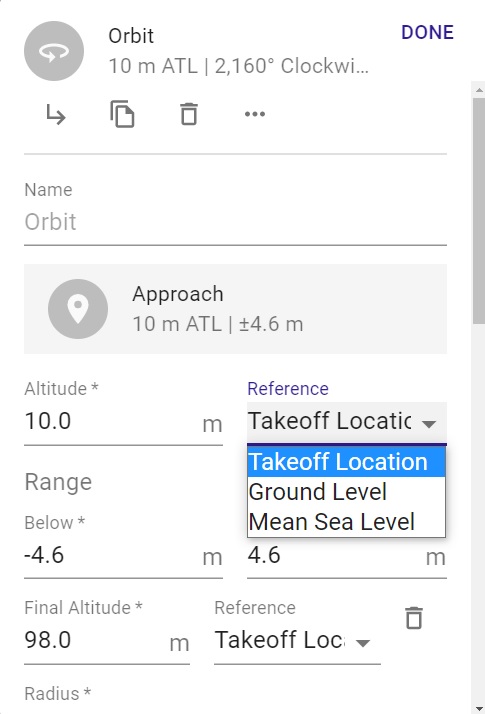
Febrian: You didn’t indicate which drone you will be using. Your primary question about Attitude is simple though if using it with a DJI drone. You don’t need to add a drone command in the plan for max altitude. All the parameters you set in DJI app are stored on the drone. Example: The RTH state, RTH altitude, max distance, max altitude, all camera settings etc., which were last used in the DJI app will carryover and be used for Dronelink app. The Max altitude you can set on the DJI Mavic series can be set to 1640 feet “ATL” so no reason to add a component. Enjoy.
Arizona Wyldwest : i am using DJI Mavic Pro. I already unlock the altitude limitation using Nolimitdronez app. I also unlock the NFZ limitation and also using 12000 Mah battery. I use my drone to capture the mountain volcano activities in Indonesia. I have plan to fly to the 3,600 m mountain. And take off from 1,200 m above sea level. My plan is fly following terrain 100 m above the ground from my take off point until to the top of mountain. Yes, i will only fly 80 m or 100 m above the ground following terrain. Is this possible to do this with DL app?
That is my plan with Litchi app. The app limited to max altitude 500 m above my take off point. So it will stop at way point 8.
And i want to know what is going on if i do this with DL app?
Even utilizing the Max Altitude Component I try to set 3000 for example and rolls back to 1640. I guess that is the limit in the app as well.
Nelvick Berrios : no problem. If i can following terrain above the ground altitude.
It can be done but you need to realize that using terrain follow “AGL” in a path uses ESRI data and isn’t at every point along the path but rather every 30m, roughly 100 feet of horizontal distance travelled. Use with caution when trying this function.”
Need to set the purple reference pins “Takeoff Restriction” to Specific Area.” Then set the paths “Reference” to “Ground Level.” The Best way I’ve found that works with varying elevations over a distance is set as I described and then place Markers at intervals and set the AGL Altitude at where you want it. Depending on how you set the interpolation to each marker will effect how it responds also.
I always run the mission preview and export the KMZ file to Google Earth on any plan where I have never been to the location. It works really well overall and this way you can see how how it looks before actual flight. Once viewed you can change any of the markers at any point to a different altitude if you see any areas which need changes. As I stated already, be very careful when flying a mission using AGL. The app will actually give you a warning when changing it to AGL.
Good luck. Mike….
This information has been discussed by Jim before.
Here is a link to another post which Jim commented on about AGL, (Terrain Follow.)
https://support.dronelink.com/hc/en-us/community/posts/4408832599571-AGL-and-elite-plan-mapping-uneven-terrains-
Btw, what happen if i lost signal when flying the mission? When i use Litchi, the app keep doing the mission. How about dronelink?
Febrian Djaka Putra: if your drone loosing signal more than 10 second the drone will activate RTH. What kind of RTH? The last one which was done by:
1. Any application (DL, DJIFly, DJIGo, Litchi ...)
2. You can insert an drone command into your mission plan: "Drone Connection Fail-Safe" and choose between: Auto Land, Hover, Return To Home
If you convert the mission to DJI Waypoints the drone can use onboard commands and will be able to finish the mission if the signal is lost. Just make sure to select when the mission is finished RTH and not to hover that is the default.
By the way, i cant understand why is that the default. That is really bad if you forget to change that.
Be care if using onboard waypoints. Its your choice but I would not use onboard waypoints for a mission like that which is risky. If it loses connection it may finish but you will have no control and can’t see where or what it is doing and it could crash. I understand some like onboard waypoints but for me it’s not worth the risk. I like having control of my aircraft at all times and I’ve never lost a connection. If it ever did I’d rather have it RTH at a high altitude and not lose it or crash it. Better for me to not have the mission complete and get my drone back. Just some thoughts.
Febrian: If you purchase Dronelink, can you share the imported plan from Litchi ? I’d like to see it and run on Google Earth. Interesting plan and Im Curious what it may look like. Enjoy.
Dronelink cannot override the max altitude enforced by DJI's firmware.
Febrian. You asked a few different questions during this discussion which may be confusing.
1. Max Altitude: A max altitude limit is different then the Max altitude the drone can fly. The drone can only go to a Max of 1640 feet (500m), as Jim just stated. It’s the DJI firmware which controls this so no, it cannot fly this plan in one mission. You could break it up into many separate missions but it would take a lot. (The Max Altitude command in DL will not change this)
2. AGL: You can use AGL in a mission if the Dronelink plan you purchase has this feature. As stated in other comment, (“Use with caution”)
3. Google Earth: Again, if you purchase a Dronelink plan which has exporting to Google Earth, then yes
4. Signal Loss: (Virtual Stick) If signal is lost between the drone and controller, the drone will initiate whatever you set in the DJI app. RTH, Land or Hover. If the plan is loaded onto the drone, (Onboard Waypoints), then it will continue. (Not all drones have onboard waypoints capability)
Good luck…..
One other point to clarify here, map is the only component type that does terrain follow. Other components, such as path, support AGL markers, but do not do terrain follow. For path specifically, you would have to add as many AGL markers as you wanted granularity.
Good clarification on AGL vs. Terrain Follow. I mentioned earlier about AGL markers but maybe it was missed it. I especially set AGL markers along the path at locations where I know the elevation changes, particularly when higher hills are present. I highly recommend running any mission on Google Earth before any flight which may be questionable. It may take more time to view and edit the mission but it’s worth the effort to make sure it will run without issues once on location. This way you won’t need to spend more time editing on location. I use Google Earth a good amount of the time, especially on any plan where I question the Altitude. 👍🏼
Please sign in to leave a comment.