Tip : using a wide screen to speed up editing a mission

Hello,
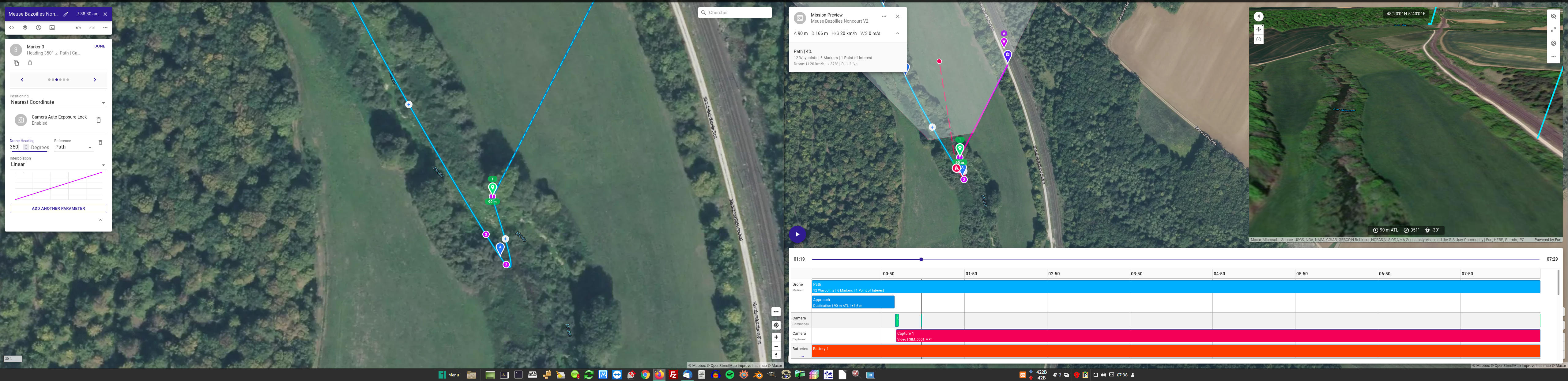
I'm using a large screen (5120x1440).
Using dronelink with 2 web browser windows is helpful :
Left side : edit mode.
Right side : preview mode
Right side : if I see somewhere on the timeline the camera red dot out of my drone path, I add/edit a marker and adjust drone heading.
I only refresh preview when the entire mission has been viewed to check the final result.
This is faster than closing the preview screen, edit, reopen the preview screen (ping-pong editing)
I would like dronelink to show a red line for the camera instead of a single red point.
We could be able to see at a glance if something is bad.
Being able to edit in preview mode like any NLE video software : maybe in the future ?
Comments
3 comments
I understand your explanation of using two screens. However, it takes a few seconds to load a 20 minute mission preview on my iPad. My PC is no where as fast as my iPad and can take 20 to 40 seconds to load a longer mission preview. Maybe that’s your issue with the amount of time to load preview. A more powerful, faster PC or device will make a huge difference.
Not sure if I fully understand your question about camera line. There is a red dotted line for the camera direction from the drone. If that’s what your suggestion was about camera.
Enjoy.
I only use 1 monitor.
it takes a few seconds to load a 15 minute mission preview on my computer.
But refreshing the window to show edit changes is longer as you go back to edit window, and must clic preview button.
Camera line : camera red dot moves with timeline (screenshots 1, 2 and 3)
Screenshot 4 shows what could be that line - no need to scroll the timeline to see what the camera will show.
Your blueline shows dronepath without scrolling the timeline.
A redline would show the camera target path !
Moving this to feature requests.
Please sign in to leave a comment.