Mini 1: Orbit mission, jerky video footage.

Hi,
I saw that there has been quite many questions and also answers to this topic, but now when I have read all those, I am still not sure what the problem is and more help would be needed. I would think my setup would give a smooth flight. If somebody has Mini and has overcome these problems, I would appreciate your feedback.
Mission charasteristics:
- Mini 1
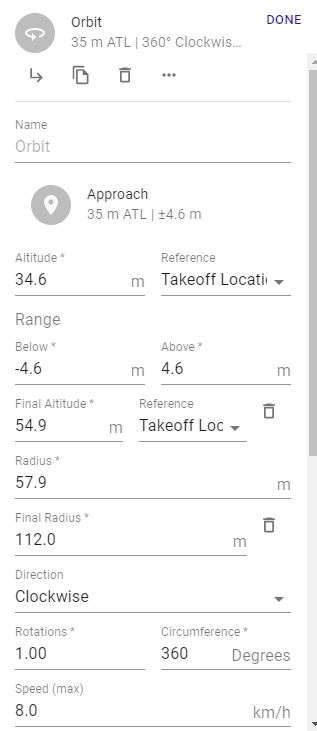
- Mission: Spiral (radius: 58 --> 112m)
- No wind
- Samsung Galaxy S10, very little extra SW
- Drone speed 8 km/h
- Drone distance from controller about 300 - 400m
- No other disturbing WiFi traffic (very rural area)
Video: https://www.youtube.com/watch?v=GM3gMZkHQ7k
You can clearly see that the video footage has those irritating jerky movements. If I fly this same kind of mission manually (DJI FLY CineSmooth), I don't see the similar problems, or they are much less.
Does DroneLink save any Tx/Rx signal strength log from the flight? Or is there any other third party SW that would do this? I would like to see what is the rf transmission quality (dBm, package loss, latency etc) to exclude this option. Thanks!
p.s. It could be beneficial if the DroneLine native app GUI would show (if wanted) the rf statistics, like dBm values.
Comments
6 comments
That’s actually a 360° rotation but same issues as with an Orbit. This is a known issue and haven’t seen a fix at this point. The Mavic Minis are more difficult to get smooth Orbits for many reasons. I have the MM and the MA2, The MA2 works noticeably better. If it is possible to fix I’m sure DL will update us. Until then all you can do is slow it down more and see if it helps.
Good luck, Mike……..
Link to some more info if you haven’t read it already.
https://support.dronelink.com/hc/en-us/community/posts/360052658793-Orbit-2-0-0-129
You can also try the software stabilizer in some video editors. I've had good results with ProDrenalin ($29), but freeware AVS Editor is also pretty good, as well as much more expensive options like Adobe Premier Pro and Final Cut Pro. Of the ones I've tried, I like ProDrenalin best for smoothing out panning jerkiness, whereas some seem to be optimized for hand-held camera shakiness but don't do much to improve the orbit videos. (Some actually make things worse because they try to freeze the image and then have to jump ahead to catch up with the panning.)
@Roger Thanks for the tip. I may try this ProDrenalin one day. My target still, however is to get the drone to produce good enough video which would not need any post-processing to remove the jerkiness. Maybe the answer could be found on the rotation and acceleration parameters. I am not familiar with those. If I only could get the same behaviour in a DroneLink mission like with the CineSmooth in DJI FLY I think all would be good. Maybe one day there is a setting in the DroneLink that emulates the CineSmooth :-)
That totally sucks, I tried an orbit with my mavic air 2 and the mission started out great then extremely jerky, footage is unusable. I also tried a 360 panarama after the orbit attempt and that also was unusable. I guess I will have to use the DJI app for orbits and Litchi for 360 panoramas. The only thing Dronelink is good for with my mavic air 2 and mavic mini is waypoints, but Litchi does that pretty good also. So unfortunately I believe I wasted my money.
Were you using a mission plan with an Orbit component, or doing the Orbit mode in the on-the-fly (lightning bolt) menu in the native app?
If using the Orbit component, you can see that this issue has been discussed in many places, including this thread, and we have an FAQ article that summarizes the potential fixes.
If you haven’t tried the on-the-fly Orbit mode in the native app, you may want to check that out as well as it has the improvements discussed here.
Not true. If you are disastisified or cannot get any of the solutions to work well enough for your taste, we offer refunds at support@dronelink.com.
I Believe the the drone is the biggest component. The Size, weight, power, props and even newer technology can make a big difference. Yes, it’s been discussed over and over and It’s never been perfect. However, overall mine has worked well most of the time with MA2. As I stated above the mini will never be as good for many reasons. It may be hard to ever get as good as the DJI app which actually locks onto a point but even then it can still yaw a bit off center.
Please sign in to leave a comment.