Pan softly into a POI

Hello everyone
I have a situation in the waypoints mission planning in the browser.
It is specifically about a POI. If I set a path action point for this POI, the drone turns exactly above this path action point in the direction of the POI. And it does so very abruptly.
However, I would like to start turning continuously and very smoothly towards the POI much earlier, before this path action point, so that the pan is 100% when the path action point is reached.
With the gimbal pitch, this works by setting the pitch to zero at a waypoint beforehand. From this waypoint, the pitch then slowly and continuously decreases until the path action point is reached.
How does this work with a POI?
Thank you very much for your help.
Comments
8 comments
You need to use interpolation: https://support.dronelink.com/hc/en-us/community/posts/13420950088851-Five-Minute-Friday-What-is-Interpolation-anyway
Hello Jim
First of all, thanks for your feedback.
I've already watched all the tutorials on this several times.
In my case, I want to do the interpolation with only one POI. More precisely, I want the rotation to the POI to start at a specific waypoint or path action and not just jerkily at the POI path action.
I start here at WP (A) and would like the smooth turn to the POI to be initiated at WP (B), for example, and completed at WP (C). This is similar to what you can do with the gimbal pitch.
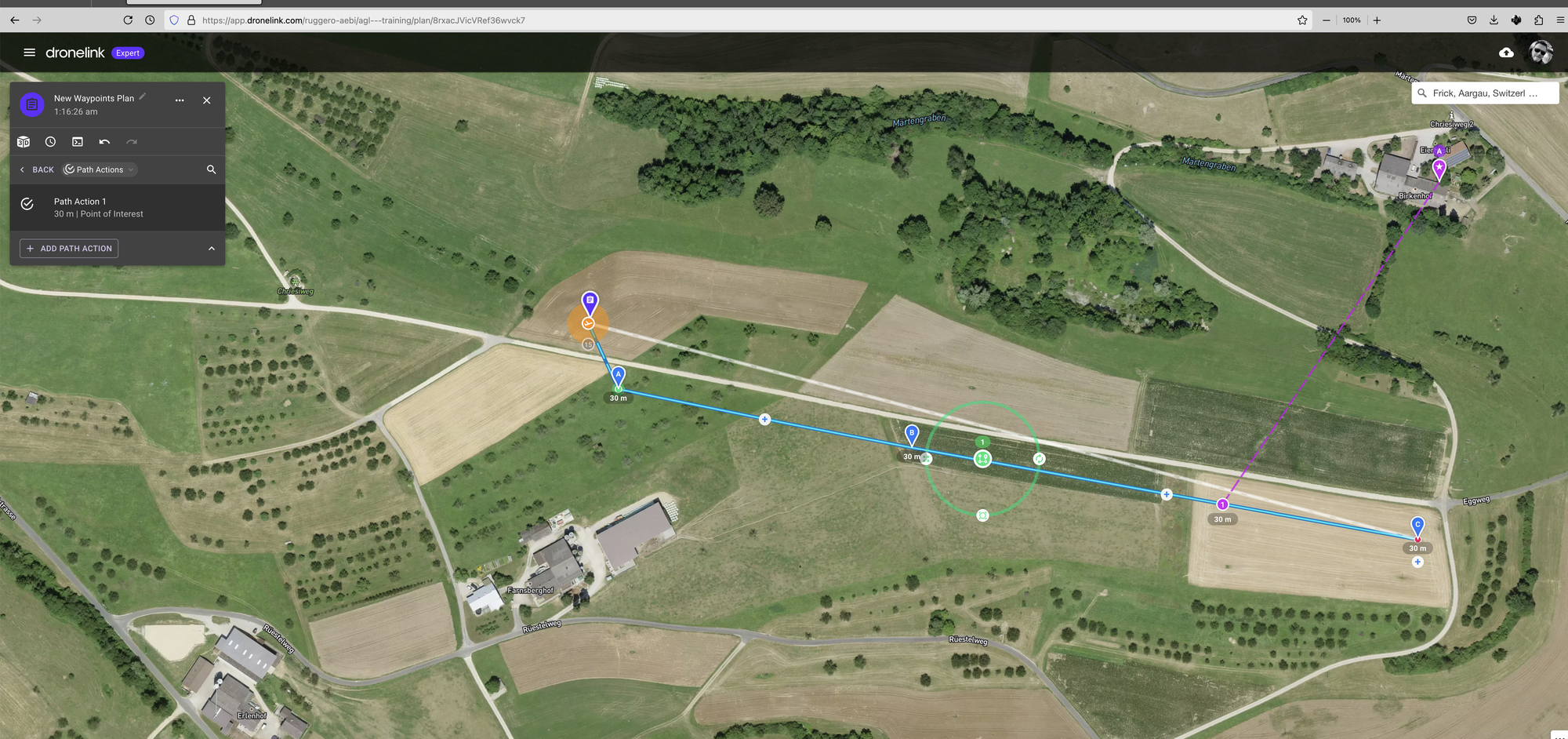
Is it possible to do this?
Can you share the mission plan?
Yes, thank you, here it is, just as described.
https://app.dronelink.com/ruggero-aebi/agl---training/plan/8rxacJVicVRef36wvck7/dtyk0UAREBpF1bPUHGHj
Dronelink doesn’t currently support interpolation between direct orientations (heading / pitch) and POIs, so if you must use a POI then you need to use a second POI to interpolate from, like this: https://app.dronelink.com/dronelink/support/plan/ECCtHEFTu4mW7yFEMbon/S0rq0rZPGBSLfv3YGoKU
Otherwise, just figure out the final orientation that you want using the 3D preview and add a path action based on that and use interpolation.
Super! Vielen Dank Jim für deine Anleitung und die tolle Unterstützung!
Deine Modifikation sieht hochinteressant aus. Die muss ich mir jetzt genauer anschauen.
By the way, did you read my post about my contributions, some of which were not published or only published the next day? What could that be? I kept getting the message that the post had to be checked first.
Not sure, they weren’t in our spam filter, so maybe you were have a network or VPN issue.
Please sign in to leave a comment.