Phantom 4 Mapping Mission Failing on Cameral Interval Setting

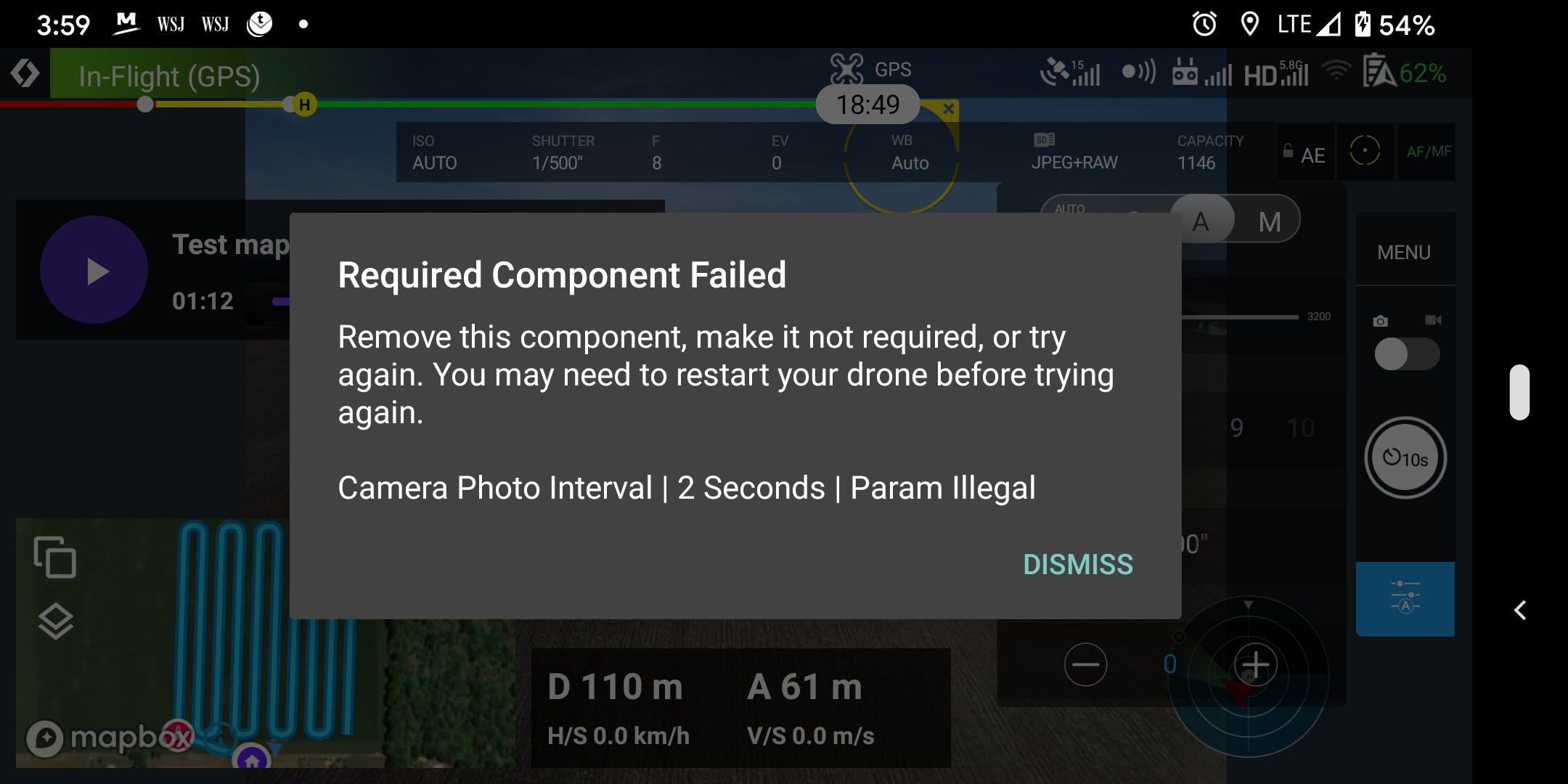
Hello - new user here trying to get a mapping mission completed. I'm flying a P4P V1 with a Pixel 3. I plan the standard mapping mission, the drone flies to the approach and the mission fails when trying to set the camera interval. I've tried all I can to work around this but having no luck. I'm sure I'm missing something simple. I was hoping there was a public repo somewhere with a working mapping mission I could look at or copy.
Thanks for your help!
Comments
11 comments
You can't do 2 second intervals with JPEG+RAW, you need to just select JPEG only.
Thanks for the quick and concise answer Jim. I knew it was probably something simple. The way you worded your answer makes me wonder if there are other options for interval shooting that are a possibility. Is there a resource or wiki that exists that contains this information?
Thanks again. I'll try to fly this again in the next few days.
Do you mean other camera settings? These are all specific to your drone and would be found in the DJI manual.
I do see where its not possible to set an interval of less than 5 seconds for the RAW type but it doesn't mention in in the P4P manual - the setting just becomes unavailable in the DJI app. I assume if a setting is valid in the DJI app its valid in DL also. That said I thought I would set up a very simple plan to prove cameral control. It seems the first two commands complete correctly but the third one aborts the mission. I have the type pre-set to RAW so I am expecting DL to change it to JPEG but it doesn't. If I pre-set the type to JPEG in the dji app the mission takes one picture and completes successfully.
Any ideas what I'm doing wrong here? This parameter seems to be a legal choice in the DJI app and is presented in the dropdown in DL as well.
Thanks!
The Dronelink mission planner presents all possible options at all times because, unlike the DJI app, it does not have a drone connected to know which options are valid or not during planning. One option would be to force you to select which drone you intend to run the commands on at planning time to validate it, but writing this feature is actually pretty complicated.
Having said that, it appears that your command should be working. One thing to try would be adding the camera photo mode command (interval) before the camera photo file format command.
Hi Jim - I think I have some insight to this now. I took your advice but made it simpler - a one command plan with just a file format change to JPEG - it still fails. The planner throws warnings about not having the mode or the stop capture set so I added those. Still aborts. I then went back to a one command plan but selected RAW+JPEG and the mission completed successfully. I changed the command to select RAW and it too completed successfully. Then back to JPEG and it failed. I do believe something isn't right about the JPEG parameter you are passing to DJI. The only option I have for a workaround until this is resolved is to use the DJI app to set JPEG then move to DL to fly the mission. Can you guys see if you can duplicate this and put it on the list as a bug?
Thanks,
Matt
The command is currently working for us.
Best regards, I have the same problem with my phantom 4. I have not been able to fix it, please help. some easy steps to solve it.
Can you please share your mission plan?
thanks for your reply. Tell me how I can share the mission for this place.
Please sign in to leave a comment.