MA2 SDK error 217 setting photo interval

This was also submitted via TestFlight. App is iOS 2.0.0 (131).
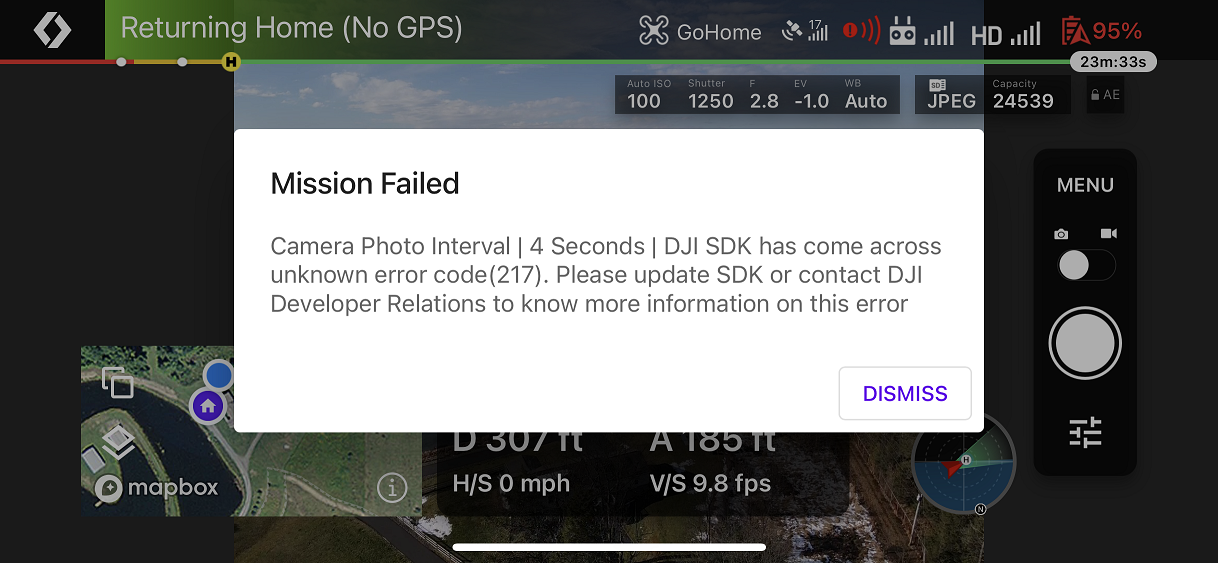
First flight with the MA2, a mapping mission. DroneLink successfully piloted the drone to the start of the mapping routine, but threw SDK error 217 when setting the photo interval.
Comments
8 comments
Thanks, we reported it to DJI.
Great. Got the same error. I can't seem to fly any missions that automate the photos.
DJI changed the way that apps should command the camera (starting with the MA2) and there are some new APIs that we need to integrate for full compatibility. Should be in the next build.
Just released the fix (build 133)
Hi Jim, thanks for the quick update. I tried it out right away with the MA2, because we're getting a winter storm tomorrow and my next shot will probably be in May.
The mapping mission completed successfully with no issues. I then tried running a verification mission for a different plan that's at low elevation and close to obstacles. That plan has an explicit "Camera Photo Interval | 3 seconds" component. When it hit that component, I got exactly the same error as above (217). So maybe it's fixed in mapping components, but still needs to be fixed for the Camera Photo Interval component?
Still getting error 217 with the Camera Photo Interval component (not the mapping component) with build 135.
Are you setting the camera into photo interval mode first?
Thanks, that was the issue. Setting the photo mode to interval before setting the interval worked. Can I suggest adding that as a warning in the mission planner?
Please sign in to leave a comment.