Sudden Movement - quicker than plan allows

This is a part of my second plan for a Mavic Mini - maybe there is an easy explanation for it. I did not fly this plan in a mission so far.
Plan "Jerky Movements 01" at: https://app.dronelink.com/peter-kursawe/tests/plan/ROULw4ywnzlaHPRD4orW
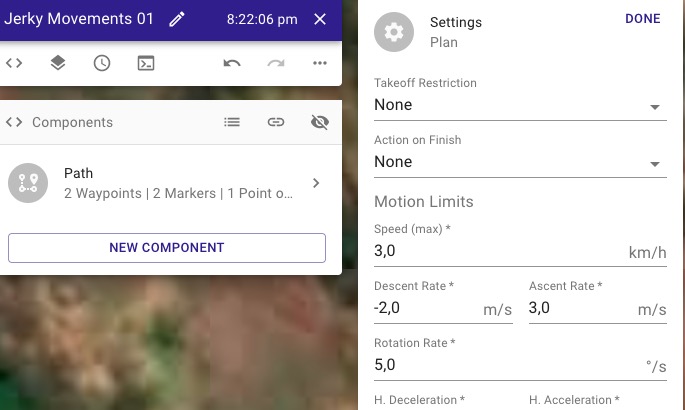
The Motion Limit in this plan for the Rotation Rate is set to 5 deg/sec.
In the plan there is one path. At the first marker I start focussing on the only POI.
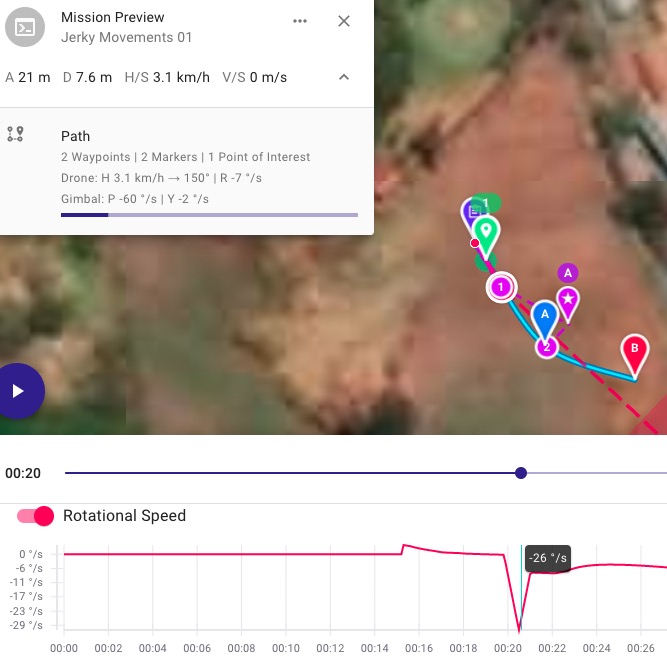
When the drone starts turning to the POI, it exceeds the Rotation Rate. See the Rotation Speed graph of the preview (also screenshot below).
Question 1: Why does the drone rotate quicker than the Motion Limit?
Question 2: Is there any way to prevent this situation?
Question 3 (not related): There is a small sudden rotation of the drone when the Approach ends and the path begins (at about 15 secs). How can I prevent this jerk?
Pic: Mission Preview with Rotation Speed graph
Pic: Motion Limit Settings for this plan
Thank you for any hints!
Peter.
Comments
2 comments
I took a look into this and there was a piece of code that was not honoring the rotation rate limit. Having said that, I just tested it after fixing the issue, and in the case of this particular plan, the drone will never be able to actually point at the POI given all the other variables (time, speed, etc). It actually needs about 10 degrees / sec in order to get the POI in the center of the frame, so the question is, what do you prefer the behavior to be?
Option 1: take the rotation rate as a guideline and try to fudge a little (go a little faster) to honor your POI setting
Option 2: strictly honor the rotation rate and never get the POI in the frame
I am leaning toward option 1 as it is a bit of a compromise between the current behavior (which goes all the way to 26 degrees / second) while also still eventually getting the POI centered.
Thank you, Jim.
Right, I did not realize that the POI would not be focussed on with these settings.
I agree, that Option 1 would be more preferrable.
Also I think it would be perfect, if the web app could produce a warning sign or exclamation mark at markers, when the conditions do not allow, what it is supposed to do :-)
Thank you again!
Please sign in to leave a comment.