Mavic mini and Simulated Drone mission preview.

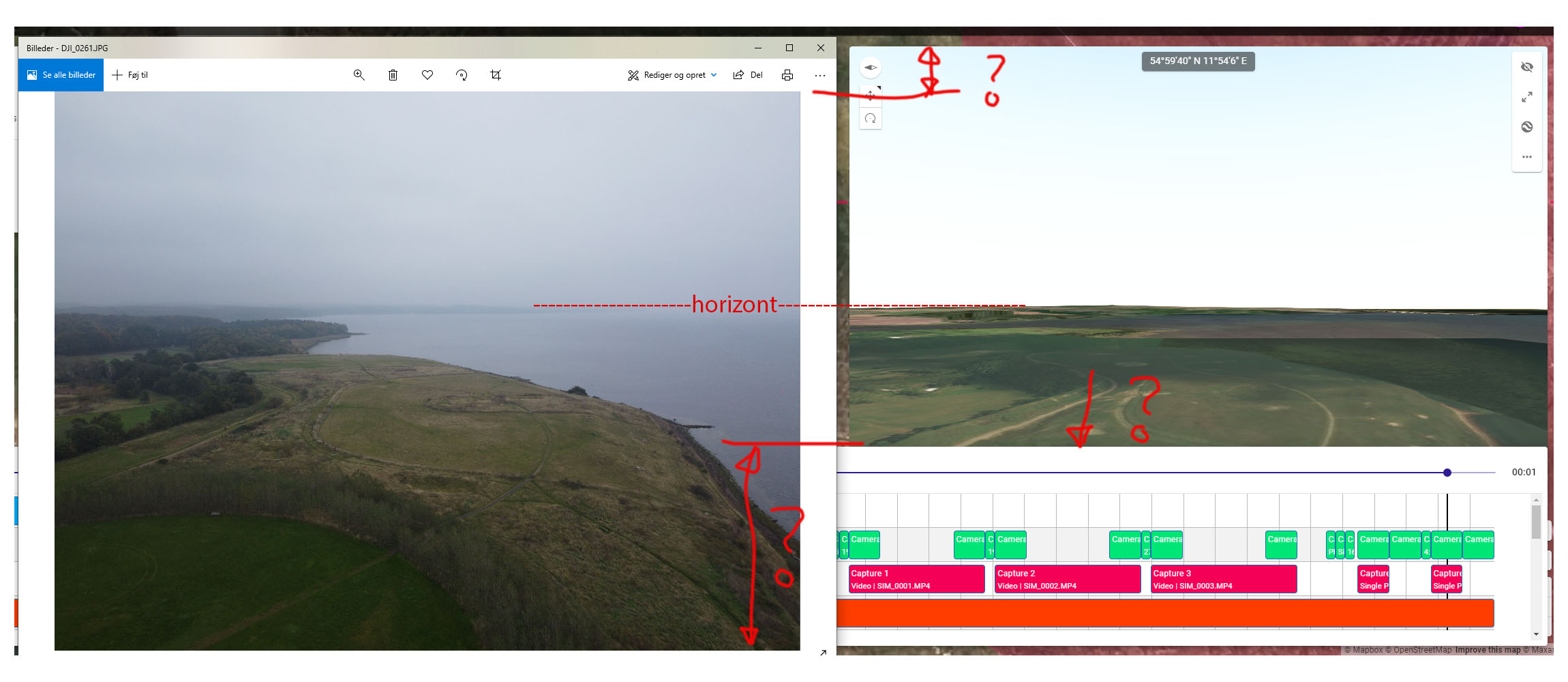
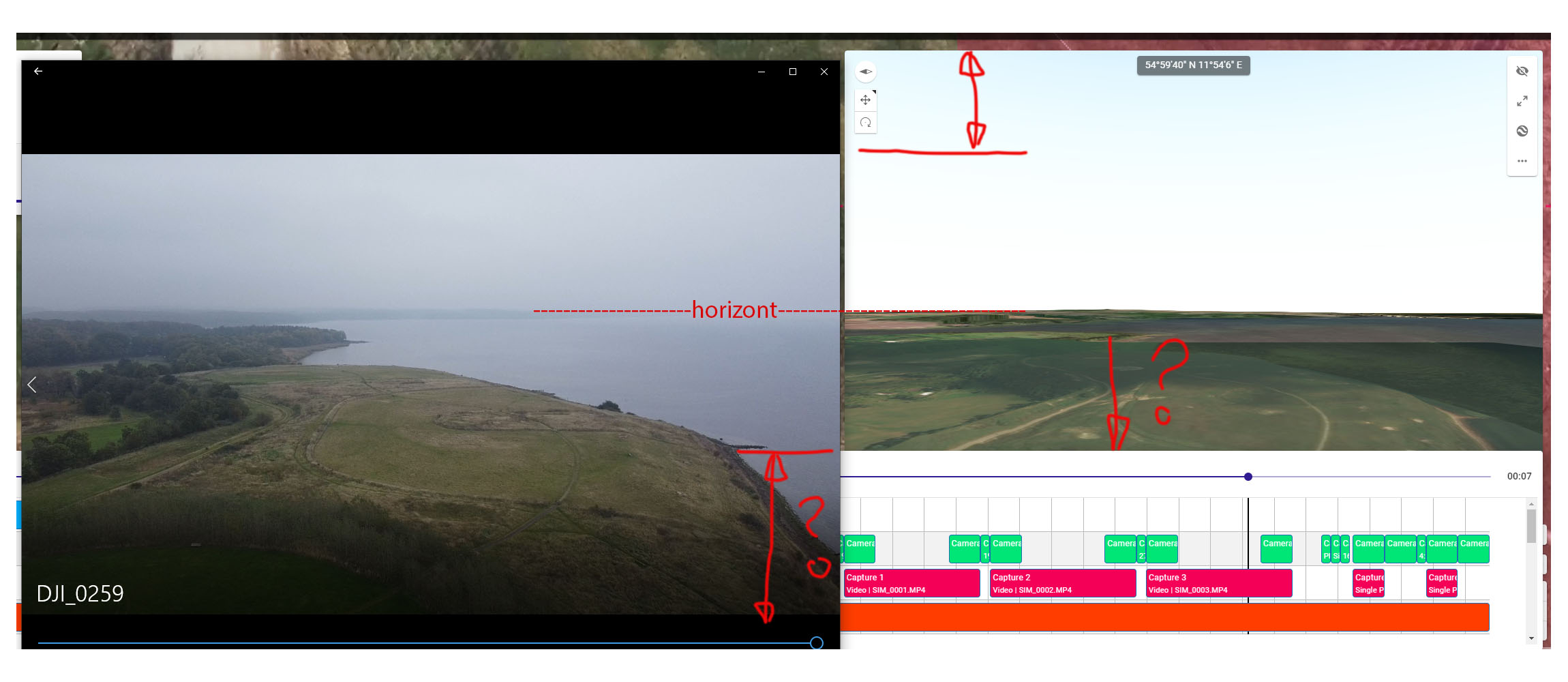
I have made a mission having the 4 different view sizes possible in mavic mini and then put the real world recording up against each other.
And to be honest it’s a bit disappointing how much out of focus it is.
Especially when this amazing tool is what really make droneling stand out from all other on the marked.
And mavic mini and Air and maybe a coming mavic mini 2 is drones there really benefit the use of droneling.
Even the size you have used (4000x3000) is out of focus but the closest but then again also the size less used for mini.
See Below Photos:
1: Photo 4000x2250 against mavic mini preview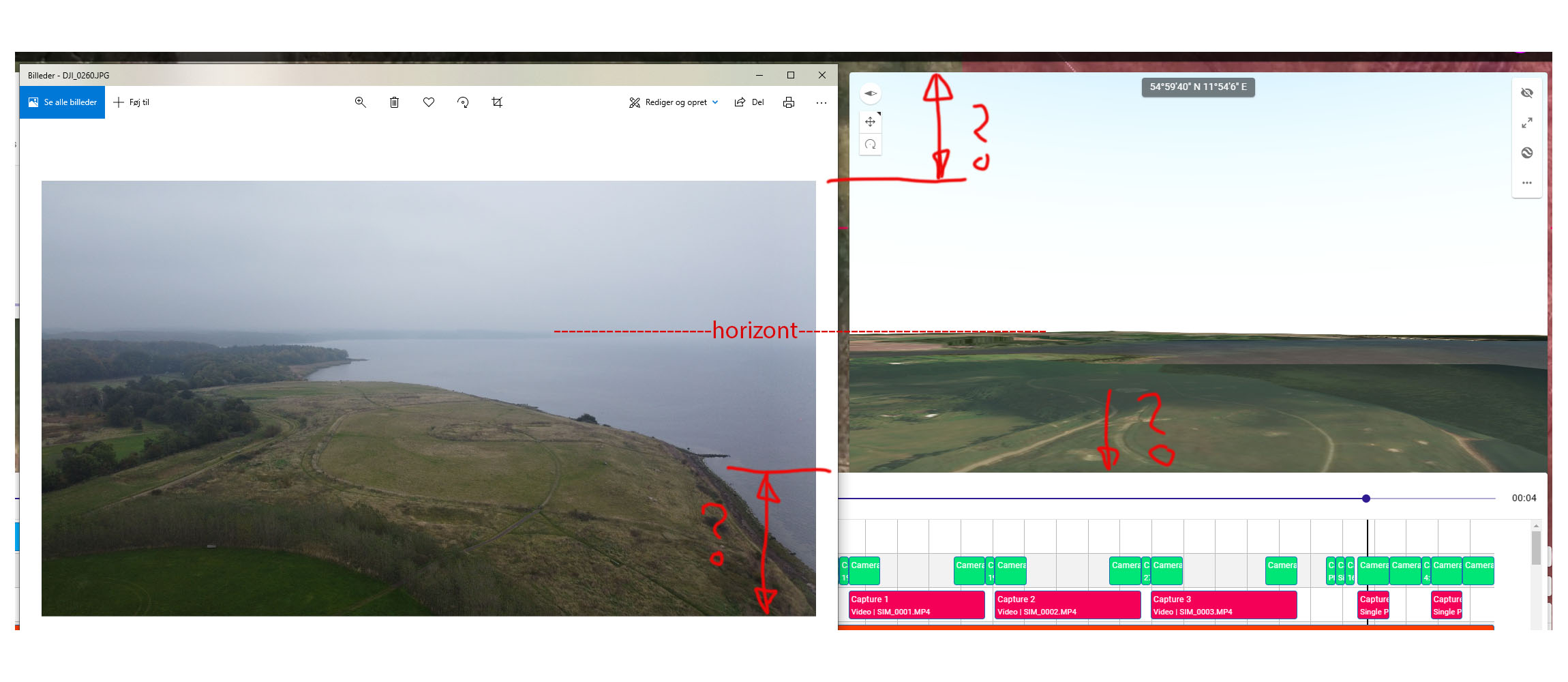
2: Photo 4000x3000 against mavic mini preview
3: Video 1920x1080 against mavic mini preview

4: Video 2720x1530 against mavic mini preview
Best regards
Per Bjørn Jeppesen
Denmark
Comments
6 comments
First, the way you have your browser sized, you can see that the bottom of preview window is being covered by the timeline so I don't think your screenshots are are totally accurate way to make this comparison. I would suggest sizing the browser window so you can see the whole preview, and then sizing the image preview such that it is the same actual size as the preview window on screen.
Second, do you have Actual FOV selected?
Third, maybe we are using the wrong camera specifications for the mini?
Hi Jim
Thanks for the quick reply.
Yes I use Actual FOV in 3d.
Your right about the real video and photo is a bit bigger than the preview but that just make the problem bigger, if I size to the same as preview as I see it. at least above horizont.
I will test the browser size later today you may have a point here:)
I dont know about the sensor size.
The biggest problem is the horizont height.
This was my result:
Not perfect but within tolerances (in my opinion). Could just be a gimbal calibration issue or map accuracy issue.
One thing to note is that the preview shows the full sensor (4x3), even if you plan to be in video aspect ratios (16x9). You can change that by selecting "Custom" for the camera type and changing the pixel width / height. What I am saying is, if you want to perform the test the way I did, it needs to be in still image mode.
Hi Jim
Did you use Mavic mini for your test.?
Interesting you get more horizont I get lees.
I did make a calibration of the gimbal before I made the test, but no one else out there have made any comment so maybe it is my gimbal there is something wrong with.
Your right about the browser, if I scale it down to 25% it almost show all in the bottomJ however all other text are getting very small, but it is possible:)
I have found a way to get around with the view for resolution (4000x2250 1920x1080 2720x1530) for Mavic mini.
Actually I have found using camera for Mavic 2 pro (full fov) setting in custom and then change sensor height to 7,2 it getting close to the real world, well sizes in (4000x2250 1920x1080 2720x1530) (not 4000x3000) when I newer use this 4:3 resolution this is only useable when making panorama. I believe people use 16:9 mostly.
Summary
I think it would be fantastic if it was possible to “click” in the drone view and this window was getting in the front and then when click in the below window (altitude speed and so on) was getting in front.
It would also be great with 2 view setting for Mavic mini 4000x3000 and 4000x2250 then all view will be supported when both video resolutions also will work with this.
And then when all this is said:
I am so impressed what you can do with Mavic mini with this software, you can sit and plan a complete complicated cinematic flight and then, on site just push play and it do it all perfect and you don’t need to make any Video editing subsequently, fantastic all that is already done in the planning:) This is A sale argument you should use:)
DJI Shout support you, when DJI drones only using Fly app is useless or at least only for fun. Dronelink change these small drones to a fantastic tool:)
And Jim respect for you, you are everywhere, answering question. :)
Yes, I was using a mavic mini. I agree that there is definitely more we could do to let people select different aspect ratios that they intend to use, but for now if it is that important to you, you can obviously change it yourself under custom, as you found out!
Thanks for all the compliments!
Okay now I have made a lot test and study and sorted this out and have a solution to people who want to have a 16:9 view in simulated drone view for Mavic mini.
First the default view for Mavic mini, is as Jim pointed out for 4:3 (Photo 4000x3000) and that’s perfect. :)
(Note: To see settings: select Mavic Mini and then custom)
Now if you want a view for 16:9 (Photo 4000x2250, Video 1920x1080, Video 2720x1530)
(Note: the perfect world would be to change Image Height, but that don’t work)
BUT we can change the sensor height to 3,55 then it is 16:9 :)
And then by study all my Recordings with drone simulated view, I have found out that the Horizon or height of the sky above horizon is different from recording to recording and go from 0 degree to -6 degree or we could call it pitch.
So this is a Mavic Mini/Gimbal thing or simply because it is so light, so this is NOT a Dronelink problem…
Sorry for believing that.
But this is good to keep in mind when planning a flight.
And again fantastic software:)
Please sign in to leave a comment.