Various Issues MA2

Hello,
I have a few issues (and I realize it's Beta.. here to help).
The App doesn't like my iPhone 7+. Seems resource intensive (lost 25% iPhone battery in about 10 minutes or so and says that the device is (paraphrasing) "low on power/resources"? Works fine with DJI Fly App.
Mission aborted about 1:30 in of a 5 minute mission. No explanation as to why: Edit - here's my mission file link - https://app.dronelink.com/ron-hoskins/1st-dronelink-plan/plan/oBkLkAeNbe2wxKIUyo4m/8EOhW191xiE4CwJsNmK5
Whenever I close the app, I receive a message every time that the App crashed. I did send a feedback message when it happened the last time.
When I replaced the drone battery with a fresh one and put my iPhone 11 phone on the controller, the mission loads at the 1:27 mark (this is when the last mission aborted with my other iPhone). Is there a way to "start the mission" over? Or will hitting play start the mission over... wasn't sure if that would happen.. Edit: I clicked the "Abort" link on the file page and it did revert to zero time.
Is there an official way to save the missions when updating. The timestamps seemed to be inaccurate when trying to load the "updated" parameters (ie, I added RTH component, etc) - timestamp was about 30 minutes prior to my desktop updating the mission.
I tried it with my iPhone 11 and it wouldn't let me do the mission as it said I was too far from the takeoff point (it worked twice with the iPhone 7+). Maybe a GPS issue? I did move from my back yard to the front yard and it still gave me the error message - the distance was better, but I would have had to cross the street to reduce the distance further (it was 65 feet in the back yard). Maybe increase the tolerance a bit for this feature?
Screenshot - 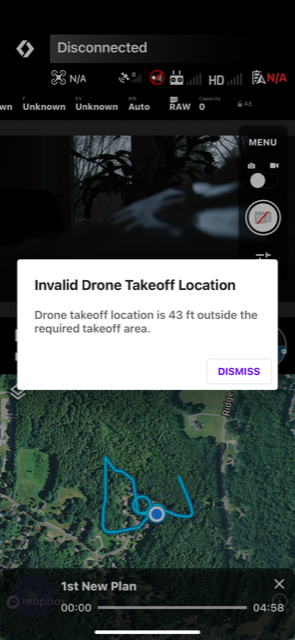
Sorry for all the issues and questions. Really love the potential of Dronelink and will help in any way I can, when I can.
Thanks!
-Ron
Comments
4 comments
Are these known issues?.. Just wondering if I've done something wrong or if they are maybe documented somewhere or something. Should I do one issue at a time?
Thanks.
It's in Beta, give them sometime to work out the kinks, but I had no issues on a few flights...
Comparing the performance of Dronelink to other apps that do not use a ground-based flight controller is not a great comparison. You should consider running Dronelink on a better device to have the best experience.
When a Dronelink mission disengages, it will show a popup message with the explanation. If you closed it before reading, you can always go back to your mission history and see the reason:
This is something in the beta that we are investigating. If you delete and reinstall the app does it keep happening?
Clicking abort is the way to do that, as you discovered.
Dronelink automatically saves your changes as you make them. Both your browser and the native app need to have network connections in order for the mission plans to sync, of course.
You either need to remove the restricted takeoff area, (orange circle on the map), increase the size of the area, or make sure your drone is within the circle when you try to start your mission.
Understood Jim, thank you. Will continue to test with my iPhone 11.
Yes, deleting the app and reinstalling cured the "App Crashed" issue.
At the time, I didn't notice an orange circled 'restricted takeoff area'... will investigate this further.
Thanks again!!
BTW, thanks much for your steadfast efforts in making/enhancing this App. I'm very excited about its MA2 support! You have no idea.... :)
Please sign in to leave a comment.