Iphone 11 Pro Max Checklist does not display properly

Had an Iphone 7 plus but could not complete a flight without errors and re-starts.
Now Iphone 11 Pro Max 512 GB and Mavic Mini.
The check list display in HUGE mode. There are not any attribute names displayed on left, and the values are pushed off the screen on the right. I think because I cannot check settings, I keep getting error: "Control Override GPS"
Comments
4 comments
I think we are discussing the first issue in your ticket.
On the checklist, will report that to DJI as this UI is from their UX SDK.
Yes, the "Control Override GPS" was discussed on another thread. But this was caused because I could not see the Checklist attributes. The mission went beyond the MAX Distance.I created an Immediate Action in the mission to set MAX Distance. It seems I needed to set MAX to more that was actually needed.
Now the Checklist display should be remedied...
I love this app for the Mavic mini!
checklist:
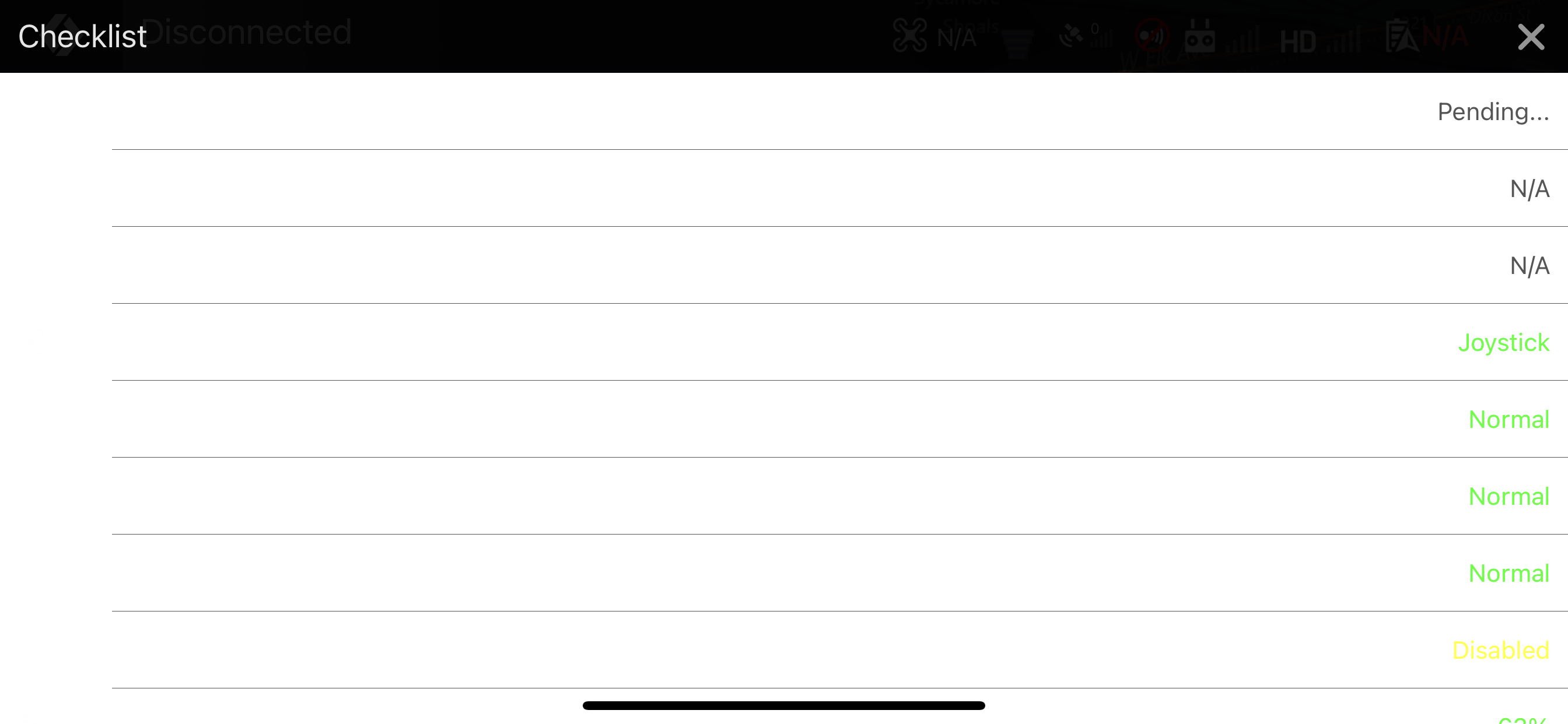
Hi Guys,
I have totally the same issue. The check list is not working well. The name of the fields are missing. The color of the values totally invisible if you are on the sunshine. The vaues are not editable! I am working on iPhone 8. Dronelink version: 1.7.2. (the latest).
Gábor
Re: the checklist. Would it be possible to reduce the width of the checklist panel when in landscape mode in iOS? iPhones with "the notch" like my 11 Pro literally block all but 2 of the status values when the notch is on the right as it would be with a DJI controller. Sounds like it's a DJI UX component, but if there was a way to limit its bounds that would be great! :)
Please sign in to leave a comment.