My drone dropped into "Tripod" mode and aborted the mission

Dear All, I started my mission, but after take off the drone stopped execute the mission and wrote the error message what you can see below. I switched off my phone, MM and the RC and started again the mission. The result was the same and I couldn't do anything with Dronelink to avoid this situation. Finally I got an idea that I flew with DJI Fly and probably I left the drone in Cinematic mode (and definitely not in Tripod mode). So I started the DJI Fly and switched the flying mode to P. After this action my mission could executed! I think Dronelink app on my phone is switching in the initialization phase the Fly Mode into "P", but for some reason the drone didn't accepted it!
I am using MM, iPhone 8 and all the software with the latest update. Here you have a link to my simple mission: https://app.dronelink.com/g-bor-bokrossy/aligai-magaspart/plan/Nc2RkCh6UOg2s7BmzpVa/2QmvxlvjB07NTiBLiVJc
Gábor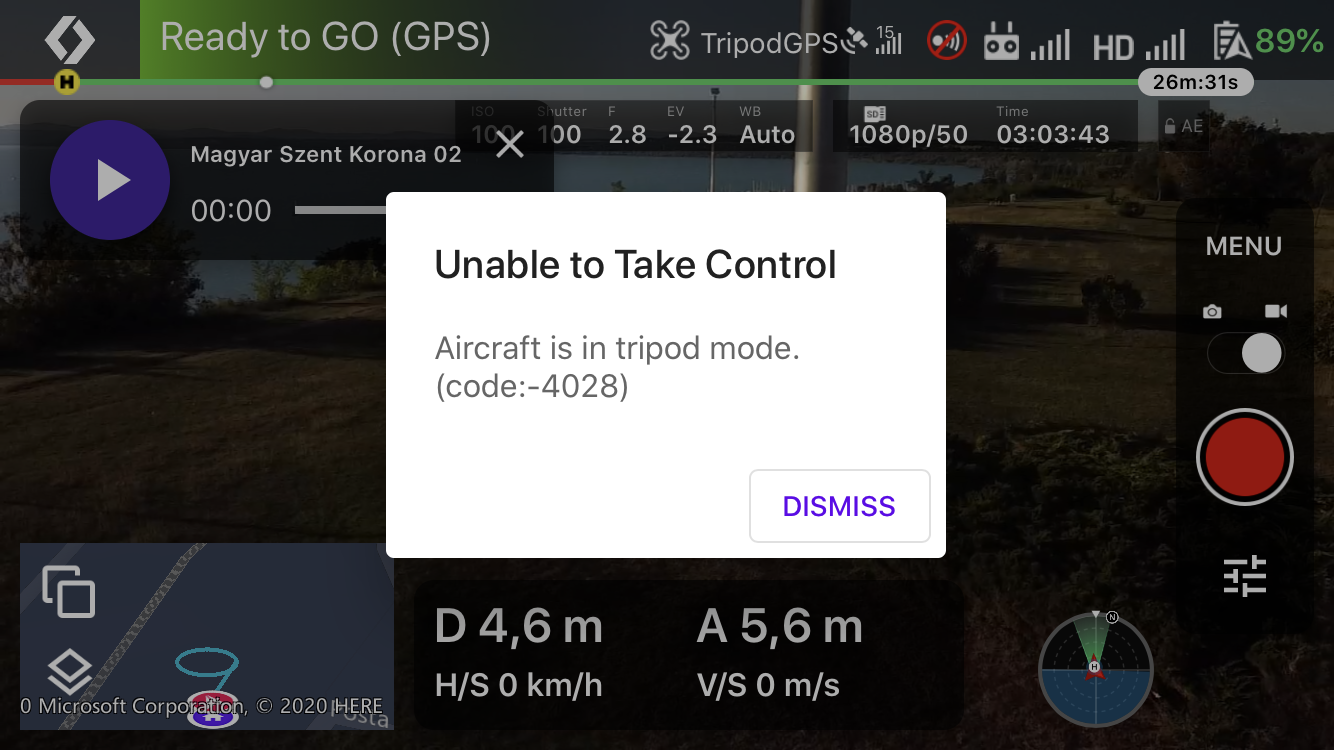
Comments
1 comment
Dronelink does not automatically change the flight mode on start, you have to do it yourself in DJI Fly right now.
Please sign in to leave a comment.