Restriction zones are not tied to geographical coordinates, but to takeoff point???

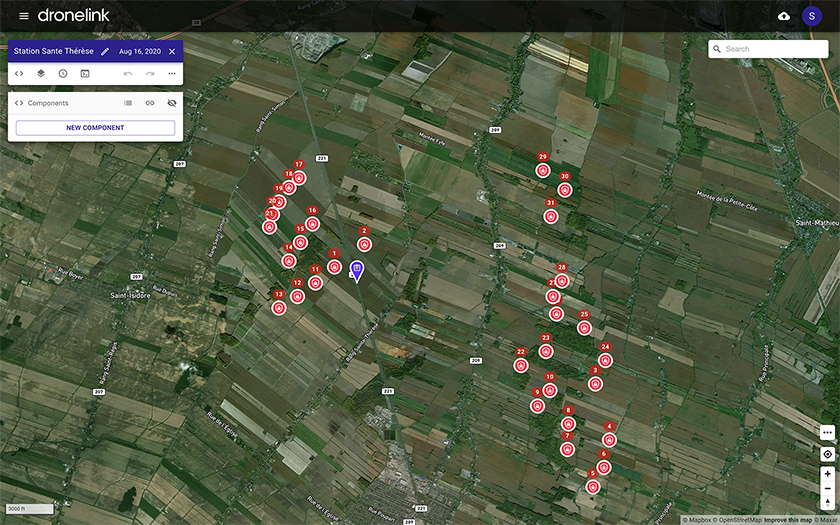
I have done a map with 31 wind turbines marked as restriction zones, between which I have to navigate.
After having done the whole map with the appropriate definition of these obstacles I discover that the takeoff point is too close to a power line. I would have thought it were possible to move the takeoff point, but if I move it, all of my restriction zones move as well. Very, very strange that the restriction zones are not tied to latitude and longitude? This may be a bug report, perhaps?
Is there any way whatsoever to move the takeoff point and leave the restriction zones where they belong in the landscape? BTW, the simulation of the video outcome is just amazingly brilliant, since these obstacles are the very points of interest themselves.
Comments
4 comments
If you right click on the map and choose move reference (only), it should work. Just a friendly reminder: if you are using this for commercial purposes, you cannot fly this mission with your Hobbyist account.
Thank you for your super quick response, and for your amazingly powerful software. But sorry, moving only the takeoff point does not work in any of the five browsers on my MacBook Pro: Safari, Chrome, Firefox, Opera or Edge. It does not work in Safari on iPad Pro either, nor on Chrome or Firefox on PC. (I also do software development in JavaScript, so I know that bugs may be browser-dependent.) When I select "Move reference only" it still moves all 31 exclusion zones as well. I put the flight plan into a public repository entitled "Wind farm example" if you want to try it out - with a misprint in the location name - there is no option rename a flight plan in Dronelink, I believe! 😉.
I am a complete drone beginner, and definitely a hobbyist with a brand new Mavic Mini only. I have not even flown one Dronelink mission yet, and would definitely not try this high-risk scenario as my first Dronelink mission. It may be far too risky due to the turbulence downstream of operating wind turbines (which I know about due to my work). I would definitely want to verify the accuracy of positioning in open terrain, and carefully test the effect of the turbine wakes gradually before embarking on this kind of thing!
You can rename mission plans with this button:
Moving the takeoff point (reference only) without moving restriction zones works fine for me:
Sorry, I right-clicked on the takeoff point marker itself, and not on the desired location. It works just fine. I also overlooked the pencil next to the name of the plan. Beginner difficulties 🥵. Thank you for your super fast help!
Please sign in to leave a comment.