Orbit mission, never accomplished, but why?

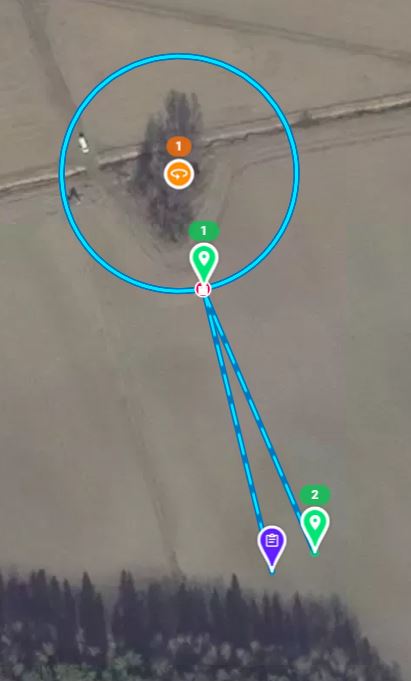
I made a very simple mission, 1xApproach and 1x Orbit and the Destination. Here the basics:
- Fly to Approach, about 100m horizontal distance, then some Orbits around a small forest island and come back home
- A bit windy weather (~ 6-8 m/s)
- Radio condition good (i.e. not too much Wifi disturbance)
- Flight level 20m above the takeoff ground level
- The tips of the trees below the 20m flight level
All started well, the drone came to the Approach and started the Orbit around a small forest island. No obstacles between the commander and the forest. When the drone was behind the trees, it stopped and stayed there for 45 seconds (video transmisison was on all the time) and then I hit the RTH and it came home.
Now I am not sure why the drone didn't complete the mission, but stuck there. For sure, there is a very little possibility that the LOS between the drone and the commander was partially lost behind the tips of the trees even though I checked this with Google Earth many times before the flight and all looked good.
If this is the case, then why did the video transmission kept flowing? And why didn't the RTH function activate automatically after the drone has sat there already for 45 seconds? If I remember correctly, this should kick in after 9 seconds or so? I have set the RTH function in DJI fly to come home for cases like this.
If the root reason was a lost onnection (although I didn't see this information on the screen, maybe due to the reason that there rolls all the time this "image transmission signal weak"), I think this is a good example that the DroneLink SW should have means to tackle these kind of short connection losts without cancelling the plan.
I don't know if it is technically feasible to buffer some seconds of the flight program in the memory of drone so it would fly according to the plan even if the connection is temporarily lost for 10-30 seconds. For sure this feature would be an option which the user can decide whether to take into use or not. Some of us could prefer the present implementation.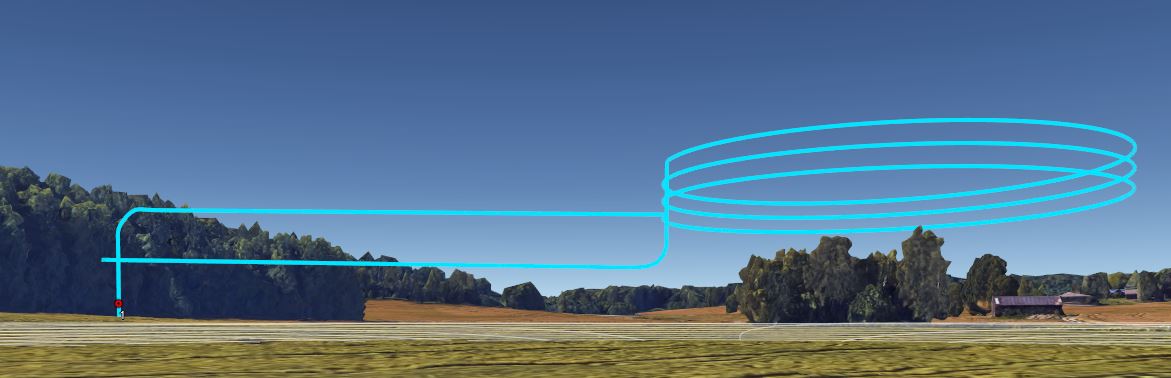
Comments
4 comments
It sounds like the drone didn't actually disconnect. If it had, you would not have continued to see video feed and RTH would have kicked in. Having said that, Dronelink does require a decent quality uplink to be able to send commands in a reasonable amount of time. The video (downlink) and uplink (command and control) are different channels with different qualities.
As far as "DroneLink SW should have means to tackle these kind of short connection losts without cancelling the plan." This is a very easy thing to say and an insanely complicated thing to do. The best case scenario would essentially be an automatic resume on reconnection, but I can tell you there is no way to have it continue the mission while disconnected with virtual stick. We are looking at implementing a compatibility option (that would remove a ton of features), but allow you to upload waypoints, but of course this won't work with the mavic mini.
Thanks Jim for your comprehensive answer.
Because I really can't have any good level of understanding on what is doable and not for Mini from technical point of view, I have, and probably still will make funny/impossible feature proposals, which are not doable :-) but this way we all can widen our general competence on this very verstaile and modern DroneLink ecosystem.
If the Mini loses the connection then Mini stops, but for how long will the remote try to reconnect untill it realizes that game is over, or is the mission over for good from the very first rf connection lost? In many cases the pilot probably just would try to align the antennas better to re-establish the connection if the Mini could wait for a while for better connection.
The controller has two antennas, therefore I would assume Rx diversity is used, but the situation would even be better if MIMO was used, but I guess this is not what DroneLink can control or implement.
Ya, we have no control over the hardware at that level. There are several levels of safety checks and timeouts with respect to telemetry delays and disconnects, but in general you should see the mission disengage within a few seconds. If that didn't happen and the video feed was still live and the mission still though it was running, but the drone was just hovering, it is possible it could have been something else like hitting the edge of a NFZ or the max distance configured in the firmware. If it was one of these cases, it can take it a while to figured that out as it is based on the error tolerance settings in the mission plan. There is an internal kinematic model that knows where the drone "should" be vs where it actually is, and when it exceeds the tolerances you will get a disengage with "Drone Too Far Off Course".
I've had this happen a couple times with the Mavic Mini as well. I identified the issue as a temporary loss of communication between my RC and the MM. It was completely my fault though... I was facing the opposite direction from the drone, so it stopped receiving commands and didn't know what to do next. I flew the same plan three times. The first two I continued facing the same direction the entire flight, and the drone froze in the air both times, almost at the same spot. The third time I faced the drone throughout the entire plan and had no issues. With the 5.8/2.4 GHz signal frequencies, the broadcast wavelength is quite narrow (~5.17/12.5 cm), so ensuring the RC is oriented properly makes a world of difference. I have no idea what your situation was, so this may not apply to you, but it's something for users to generally be aware of.
Please sign in to leave a comment.