Starting plans after takeoff? Is this correct?

So I did some testing today to get this straight in my head.
I launched the Mini manually using sticks down with Dronelink then flew to about 5 metres then ran a small test flight around the backyard.
The flight had a restricted takeoff zone loaded in Dronelink but too my surprise let me launch straight into the mission without doing anything weird like trying to land then takeoff or just refuse.
So a couple of questions...
- If you launch then run a Plan, even one with a restricted takeoff zone is dronelink supposed to run the plan without landing? (I like that)
- If before I ran the plan I had flown outside the restricted takeoff area would Dronelink let me fly the plan?
- If I'm in the air before I run a plan will dronelink head to the closest point of the plan then carry on or the first destination/path/approach waypoint? If the later it might not be so good as could run into an obstacle not on my original path, which the original plan avoided?
This functionality (launching manually then carrying on with a plan) is quite good as it would let you start the drone up manually get in the air, set precise exposure settings then move on to a 360 pano or video run using manual exposure settings depending on the day. You could edit the 360 photo component from the Public Depository to remove the light metering function.
Many thanks
Andrew
Comments
10 comments
I'll let the dev chime in because there may be some other settings, but in my testing you can't start a mission outside the takeoff zone with default settings, at least I couldn't. I didn't try to tweak anything to allow it, but it would throw an error and say something like 'you're 6 feet outside the mission start'. You can leave the takeoff zone and come back in to start - in my case I think the map overlay just wasn't quite synced with the real world so I had to move the drone over a bit to get it to start - you can watch it on the map - once it was in the takeoff zone, I could start. The drone goes to mission start height and then starts. So as long as your takeoff zone is set in a clear area you should be fine to fly around before hand and then fly into the take off zone and start when ready.
The takeoff restriction means the drone has to takeoff from within that area (whether you did the takeoff manually or the software doesn't matter). If you takeoff manually from outside the zone and then try to start a mission, it will require you to go back and land/takeoff within the zone.
The path to the first component that is rendered in the mission planner assumes you takeoff where you say you will takeoff. If you don't require a takeoff area, or make your takeoff area very large, this could result in a drastically different approach. The native app will render this line in the map however.
Thank you! Really good to know and sounds like as long as there is nothing problematic between where you finally push the start button and first component then all good. So I'm thinking make the first component quite close to the takeoff area e.g destination component
Hi Jim, I am new with your software. Look, I've got this message and could not talk off until I removed take off restriction (drone's GPS error around 2,5 meters) What people do in similar situation ? Thanks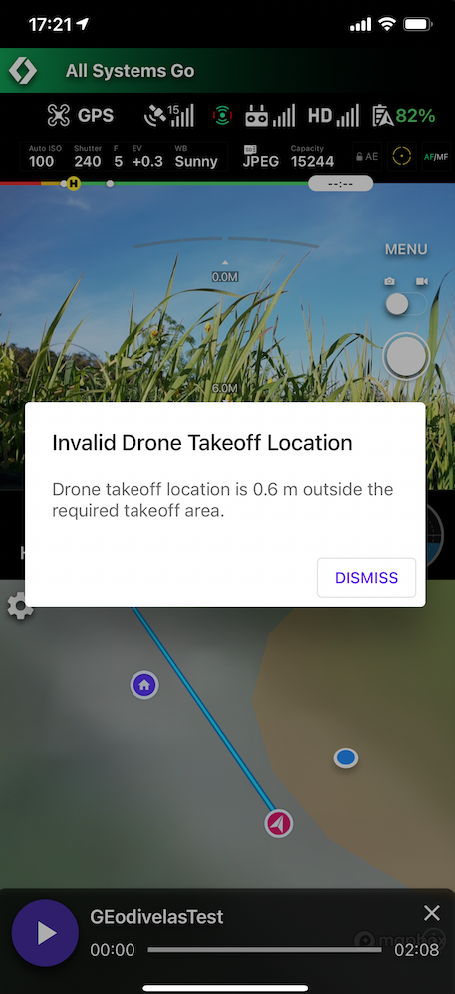
You can see the drone is outside of the orange circle. You either need to move the drone into the circle or make the circle bigger.
Jim explained it well. Just some more info. You don’t need to use “specific area” for take-off, you can just leave it set to “none” which has always been default when I create a mission. When I use “specific area” I place my drones take-off point right in the middle of the Orange restricted area or move the restricted area a bit to make sure it’s centered over where I will be launching the drone. Either way it has always worked perfectly when starting missions. Bigger or smaller restricted area can be set by dragging the circle in or out. Hope this helps. I’m sure Jim explained it perfectly but you didn’t need to use specific area. Your preference when creating any mission.
Enjoy, Mike.....
Hi Mike
Scenario: I'm ready to launch a mission with the approach altitude set to 150 feet and a Takeoff Restriction set to "Specific Area". .
But before starting I decide to a quick manual flight. When done with that flight, in order to start the original mission all I need to do is to fly within the area defined by the diameter of that restricted area, even 100 feet above that area, and "Start"?
No, required takeoff location means the drone has to take off from within that area.
Hmmm... I can't find it again but having watched all the videos I seem to remember an occasion where you were taking off from a restricted area but given some branches (?) around, launched manually first to get clear of any obstructions than started the mission Still within the perimeter of the restricted area I'd assumed.
Poking around, it appears you can make the perimeter of the restricted area very large. No practical use of course but just playing around with it I had it out to a HUGE diameter, surrounding local towns in the area. Kept going until it eventually froze the browser. Hey, it's always someone, 'ay? :-)
As I understand it if you set the takeoff to NONE for a mission in your home area, then move to another area a few hundred miles away and fly that mission (why anyone would do that is beyond me) the drone will launch then make a beeline heading back to the area where you created the mission. Wonder if anyone has actually done that? :-(
You can always manually takeoff from within the restricted takeoff area. The point of doing this is when you cannot ascend straight up from the takeoff point (so as to dodge the foliage).
Please sign in to leave a comment.