Spherical Photo - just a mess

Has anyone managed to get a 360 spherical photo using "360 Photo" script? What stitching program did you use? I'm trying with Photoshop but it doesn't work, I can't get a correct photo.
Could it be that with the Mavin Mini which has a different focal length from the other DJI's, the heading degrees of the various photos must be changed in the script?
I can upload the photos I got to the internet if anyone wants to see them and take a test.
Someone can make a tutorial ?
Comments
17 comments
Hi
I have uploaded the photos and the resulting stitch from Photoshop.
Someone can get a right sttitching ? A real 360 spherical panorama ?
Obvioulsy there are files missing because the mavic can not raise the gimbal more than 20 degrees and so the upper part of the sphere is missing but if the stitching software really need it, i think you can make some blue images and put together with the others.
you can find all files here:
https://drive.google.com/drive/folders/1Kqpr3jZPRgSCE_DQzN7yLJvrvMUJmnaV?usp=sharing
Hi Sergio you can try Autopano or Ptgui.
Yesterday I did my first "On the fly" 360° with the Mini and the photos stitched successfully.
Sergio,
You need more images, did you upload the entire shoot to gdrive?
Jon, the uploaded images are exactly those taken with the DRONELINK script
row 1: 9 photos
row 2: 7 photos
row 3: 6 photos
row 4: 1 photo, looking down 90 degrees.
As I wrote, the upper part of the sphere is missing.
Jon, do you also use the 360 photo script? Or, how do you do a 360 ?
Raul, I am on vacation now. I brought with me only the “work laptop” and not my private one, forgetting that on the work one I can not install new software (I.e. Ptgui and Autopano).
But if you confirm that the Dronelink 360 photo script is good, I will continue to shoot and then I will stitch at home.
thank you
Raul can you please upload the 360 pano that you can obtain with my photos ???
I would be very glad and happy to see it
thank you
Sergio
Sergio, use Microsoft ICE. It's stupidly easy. Upload all photos, automatically stitched together.
https://youtu.be/q6Ff917kGpU
Follow this video, just forward to where he does the stitching. Really easy.
Sergio, I did one for you. Took about 2 minutes with MS ICE:
Screenshot
Check it out here
The first link was broken. Use this one. Look for the full size PNG file.
https://drive.google.com/drive/folders/11hQXfQcnxBr7IWznzN72dNHtNthD-_-Q?usp=sharing
Also, Hi Sergio!
Hi Sergio, sorry for the delay, out of my house.
Resized to 25%. The 360 photo script works like a champ :)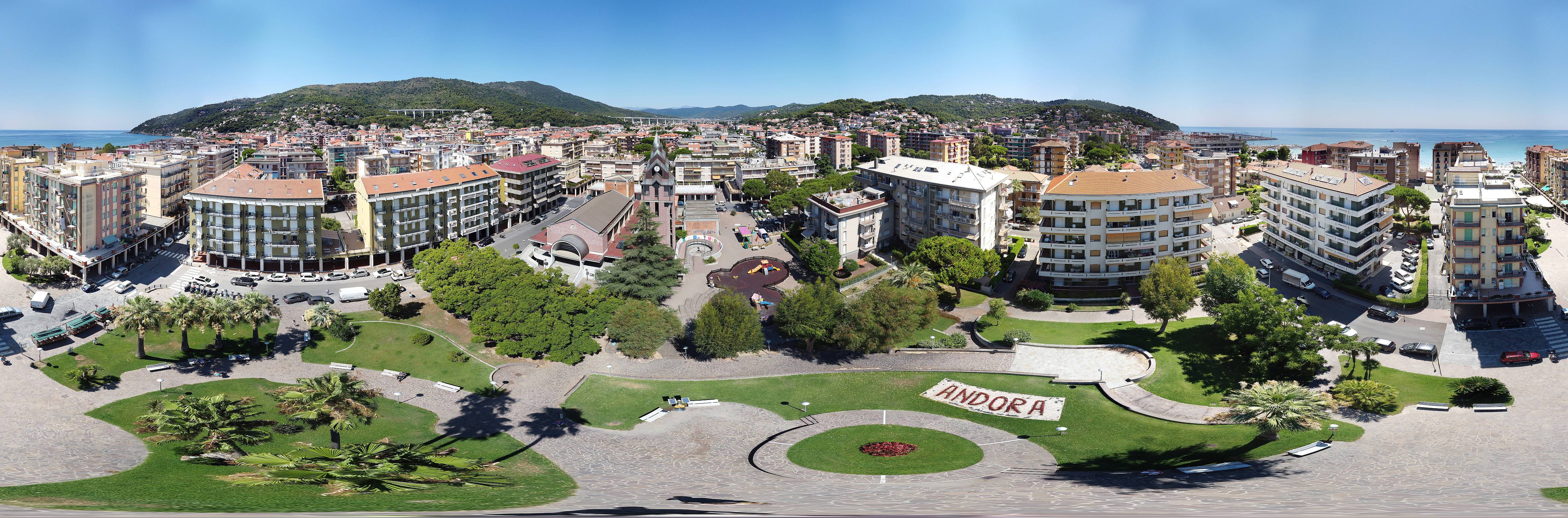
Full size:
https://drive.google.com/file/d/1gMK9ruJkGZ9lD8miq4mGe-tbWnTeBqsZ/view?usp=sharing
Raul & Mark, Thank you so much !!
I am really happy with the result and I am also happy I can continue with other 360 !
I will forget Photoshop and I will try ICE, Autopano & PTGUI when I will be at home again after vacation
Happy Flying !
Sergio
Great to see the users working together! Excellent stuff.
If you want, post it to our FB page and I'll share it!
Discussion forums are the best thing you can find in internet.
:-))
@Raul,
sorry to bother you again. I loaded your photo in my OCULUS GO but it does not display correctly.
I wish to have and equirectangular projection, so you can turn your head and see the sphere around you as you were there in the reality.
I bet you know what I'm saying, anyway.... this is an equirectangular 360:
https://dronerush.com/wp-content/uploads/2019/04/DJI_0209-EFFECTS.jpg
if you do not own an Oculus, just download FSPViewer (it's free) then you can load the 2 photos and see the difference.
I suppose that PTGUI or Autopano give the option to output an equirectangular.... ?
thank you
Sergio
OK, I have found !
If I load your image
https://drive.google.com/file/d/1gMK9ruJkGZ9lD8miq4mGe-tbWnTeBqsZ/view?usp=sharing
in this page:
https://360toolkit.co/preview-panorama-viewer
it looks correct, but the upper part of the sphere is black.
So, to obtain a complete equirectangular, it's enough to expand the canvas of that image so the height is half of the width and then fill the upper part with blue.
When I will be at home I will prepare a complete TUTORIAL for 360 Photo with DRONELINK (and Mavic Mini)
PS: Raul, your link was "public" 2 days ago, but now it require to ask permission
Hi Sergio, the gimbal in the Mini can't capture all the sky region an like you said we have to expand the canvas to the 2:1 ratio an fill it. If you see the picture for example with Google Photos the app fill it automatically.
The link: https://drive.google.com/file/d/1gMK9ruJkGZ9lD8miq4mGe-tbWnTeBqsZ/view?usp=sharing
Have a nice day!! :)
Please sign in to leave a comment.