WEB UI: Changing element properties from the Project timeline

I am not sure about the terminology here, but I would like to have a feature that enables me to go from the "project timeline" (i.e. the graphical presentation of the mission on the bottom of the WEB UI) to the element I just have double clicked and EDIT it also.
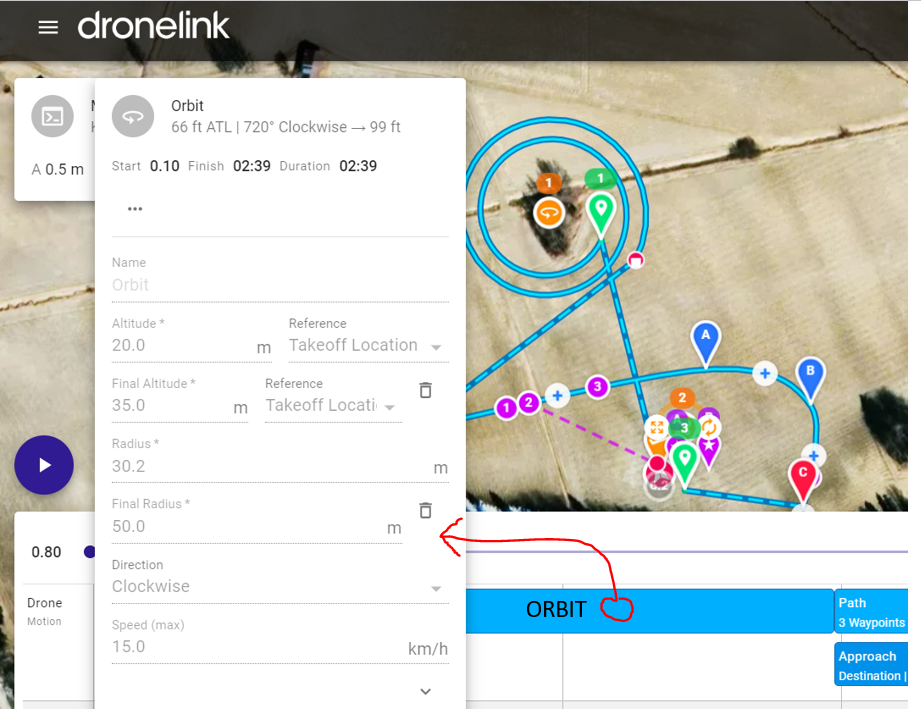
The SW as it is today doesn't allow me to edit or change anything there. In this attached picture I have chosen the "Orbit" by double clicking it on the project timeline, and the element window (Orbit) opens, but it is read only.
Comments
2 comments
You can't edit those things in the preview because it would invalidate the preview. Would you prefer that it auto-close the preview on selection and open the properties sheet in the mission editor?
Shortly: Yes.
I understand and accept that if I change anything in the preview, naturally the session would end and the user would have to start over again. Now I have experienced (with my coulple of hours of DroneLink hands on work) that if I have a quite complicated plan, it would be faster if I in the preview window could directly open the element (Mark, Destination, Orbit what ever) for editing, just by clicking it on the preview window, where I anyway have to debug my mission before it is ready.
Please sign in to leave a comment.