Grid Mission: Calculated Speed based on ???

Hello All,
I am creating a crosshatch 3D grid mission with these settings (See Images Below).
I am flying a Mavic 3 Enterprise, the top speed I can accomplish it 11mph with these setting. When I run the same mission in DJI Pilot 2, I can fly ~21mph. Why does it slow down so much in dronelink?
- Is it calculated on which drone and payload is selected?
- Is it the altitude and overlap settings?
- Timing vs distance intervals?
- All of the above?
Plan Settings: Default Max speed 10mph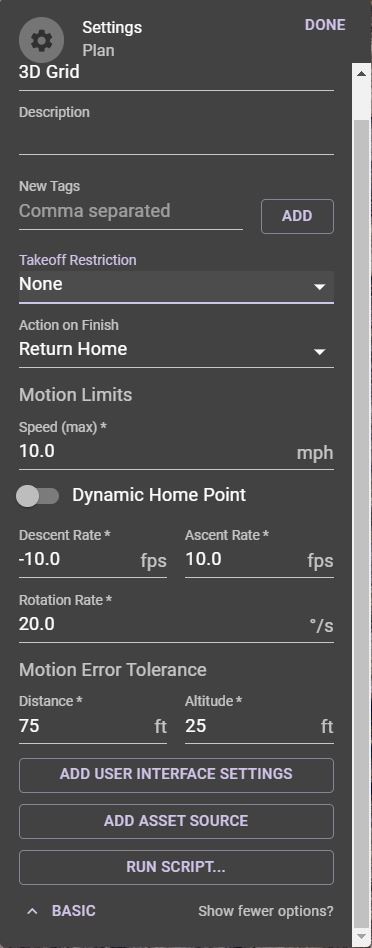
Map Setting: Default Max Speed 20mph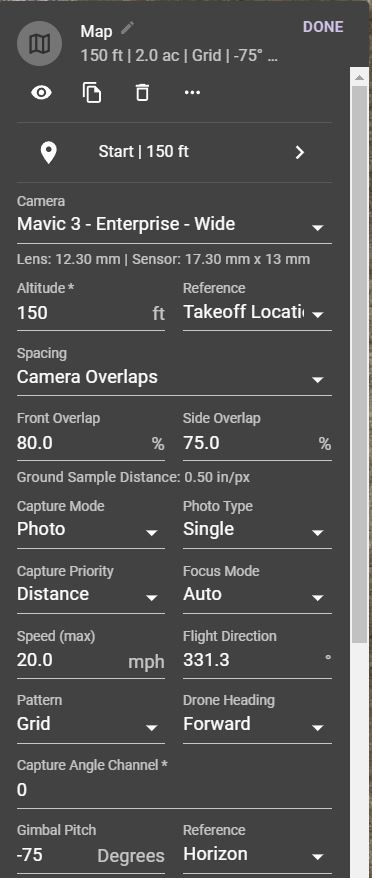
Flight Estimates: Max Speed 11mph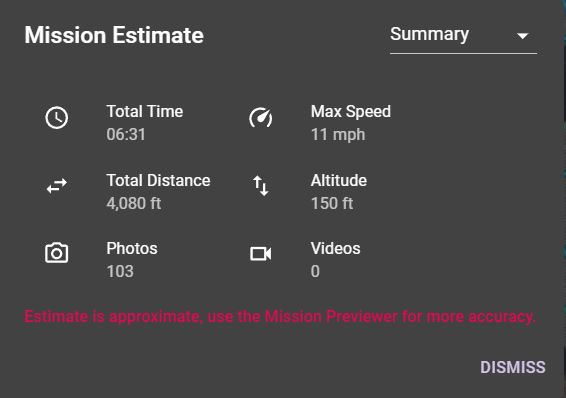
Thanks for any information you can share.
Comments
5 comments
Also, I did run the mission preview and the airspeed never went above 11 mph.
The speed will depend on many factors depending on how the map component is set up.
https://support.dronelink.com/hc/en-us/articles/4419665270803-Time-vs-Distance-Capture-Priority
Hey Mike,
Thanks for the quick response.
My process for loadoing componants was pretty straight forward.
Selected Mavic 3 Enterprise-Wide for the drone
Updated Altitude
Updated Overlap
Set capture priority to distance
Set speed max to 20mph
Set pattern to Grid
Adjusted gimbal pitch to -75 reference horizon
How do I force it to fly faster? The Mavic 3 Enterprise has a very fast global shutter. It should be able to fly at faster speeds.
Is there a different way to setup map componants in a mission, that would allow speed to be changed?
Thanks
I am using a growth plan.
I think I found the issue...the "Min Capture Interval *" is not automatocally set when you enter the drone model. I updated the min interval value for a Mavic 3 Enterprise to 0.7 seconds. Then the mission preview was flying between 18-19 mph.
Much better.
Please sign in to leave a comment.