Question about message: "Locale Changed"

Hello all,
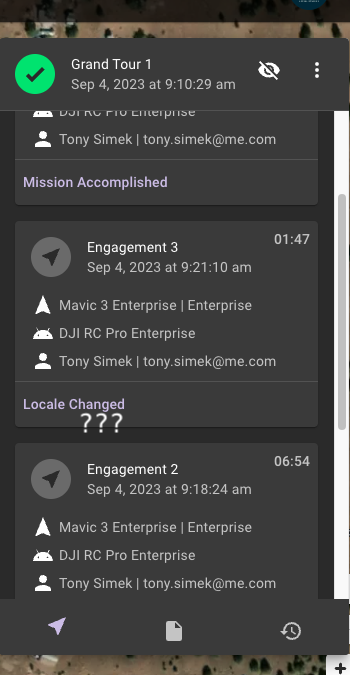
I was flying a mission with M3E the other day and at a point in the execution the mission stopped and I got a dialog message saying "Locale Changed". I was able to resume and the drone continued on and finished successfully. It happened again same day, different mission I believe, and I was able to resume and finish both times.
What does this message mean? I searched but not finding anything of use. I was using the latest APK (first time).
Comments
8 comments
This message happens when I change the language of your account (from another device) while a mission is running. If you didn't do that, are you able to reproduce the behavior because if so, that is a bug that we need to investigate.
I had my other tablet and did log into Dronelink. Yes, that was exactly it! As far as changing language, do not remember doing that. But I will go and look at my account preferences on the other device. Thank you!!!
Jim McAndrew I checked both the RC Enterprise controller language setting in the DL app, and it was set to English, and I went to my tablet, logged into DL, and it was set to English there as well so not sure why it happened. That said, I don't usually create the next mission while flying a mission, so probably induced my own fault. : )
Hi Tony. Not sure how often you check your email but I just sent one. Nothing to do with DL so don’t want to discuss it here but looks like a great new feature they added in the DJI app.
Got that Mike! And yes, they added some cool new features today. Every once in a while DJI delivers. : )
Jim McAndrew - I have been seeing this near the start of a lot of M3E missions lately even when my controller has not internet connection. I am starting to think this is some kind of bug. I will work on how to reproduce it reliably, but just giving you a heads up this may be a minor issue.
Let us know if you figure out the steps.
Jim McAndrew - I think what is happening is this. When I create new missions I often use Brave browser from desktop. When I start creating a new mission language is set to System.
In the field, when I start up Dronelink with no internet connection, it defaults to system. As soon as it gets any kind of connection, or if I go to fly a mission that was created using English, it gives a "Locale Changed". I think this is not a bug as you noted previously, I just need to have more rigor with consistency on my side. I just never really had this pop up regularly until my post a month ago.
Please sign in to leave a comment.