Final mapping altitude when AGL is set.

Hello,
I am testing Map with AGL and Starter subscription (terrain follow).
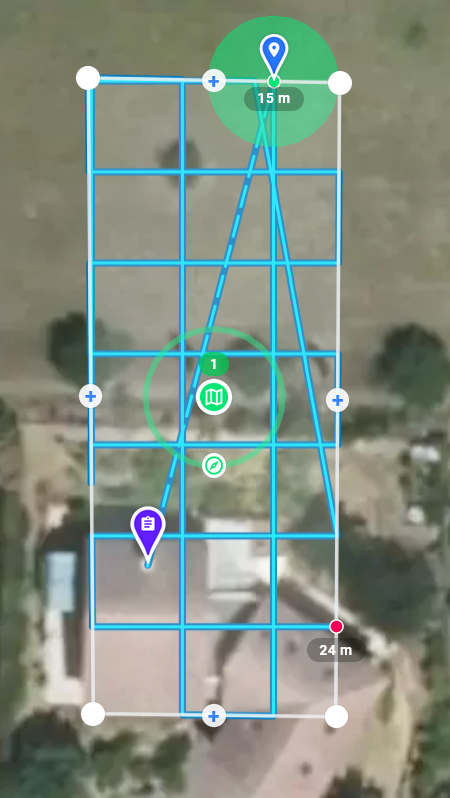
I set Altitude to 15 m that we can see with blue point below.
Red final point says 24 m.
What does 24 m corresponds to, knowing that altitude is supposed to remain constant ?
Thanks.
Comments
7 comments
It is the altitude above the takeoff location. If you want to see the AGL, hover over it.
Understood.
However I am not convinced by the End Point TO altitude computation : when modifying the Start Point location of the Mapping, then the End Point moves consequently. It happens that the End Point TO altitude changes even if it is located at the same GPS coordinates. That is physically impossible according to me.
That said it is not a problem given what I have to do.
Can you show a video or screenshots?
Differences are no significant as the map area is small. You can notice a EP difference about 5 m for 2 SP locations.
EP @ 25 m (TO) :
same EP @ 30 m (TO) :
I was able to achieve 10 m in some cases.
In that case, EP = Reference Point.
As I set 20 m AGL, why the EP is given at 30 m TO ?
Shouldn't it be 20 m as when hovering over ?
This is not how terrain follow works. It requests ground elevations from the underlying ESRI data layer at points along the path every 30 meters. Then it interpolates the other points along the path between the two nearest ground elevations. If you are looking for accuracy / precision within a few meters along the path, this is not the solution for you. It was designed primarily for medium to large sized maps flown at higher altitudes.
Good to know.
Thanks for the time spent to clarify the Use Case.
Please sign in to leave a comment.