
Popular Resources
-
<% blocks.forEach(function(block, index) { %>
-
<% if (imageHeight) { %>
<% } %>
<% if (block.name) { %><% if (block.html_url) { %> <%= block.name %> <% } else { %> <%= block.name %> <% } %>
<% } %> <% if (block.description) { %><%= block.description %>
<% } %>
<% }) %>
Comments
2 comments
Hi there,
I had a look at your flight plan. I am not an expert so take what I saw with a grain of salt.
To answer your question 2 seconds is not enough time to write a raw file in my experience. I would start with 5 seconds and see how that works.
I did notice some issues that you may want to consider. I noticed you are using the map component to fly your line. You set 82 feet, and you set the front overlap between photos at 70%. Did you want that? If so you don't need to put a start capture before the mapping portion. As the mapping portion you build has all the camera start/stop/focus etc settings built into it.
What your flight plan is doing is starting to capture photos right from the moment it takes off and just taking a shot every two seconds with no other logic applied. As your command before the map function is to start capture. I attached a picture below of a preview of your flight. All the red dots are photos.
When you build a map using the map component it takes into account the altitude you requested and the parameters you set, and it figures out where each photo should be taken to meet your requirements with whatever camera you are using. When you start a capture before the map, all that logic gets thrown out. Because the map component has its own start capture command built in. Start captures only work on dronelink (from my experience) if there is a stop capture beforehand. You have to always stop capture set new parameters and start capture again.
Have a look at what I did, and see if that helps. I put 5 seconds in the map function to hopefully allow more time to write the raw file. If not set it higher and dronelink will automatically slow the drone down between photos to insure there is enough time to write the file.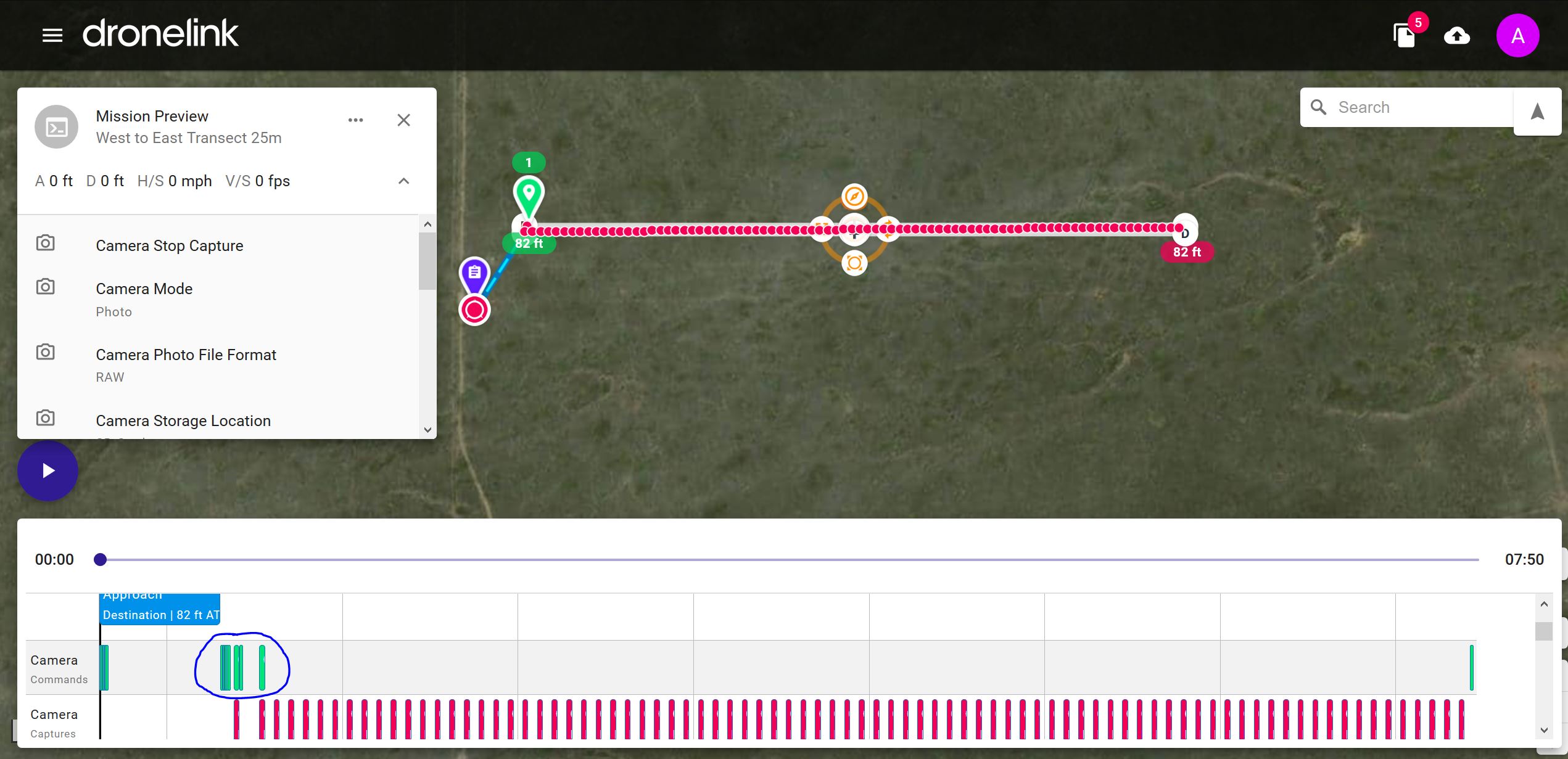
Have a look at the area I circled in blue on the timeline. Those are Camera commands being sent to your drone, and are preloaded in with the Map function. Your version was essentially overriding those.
Hope this helps.
Here is a link to what I did. https://app.dronelink.com/alan-beverstein/tutorial-stuff-i-am-doing-to-learn/plan/AcmcYRubD2ZQDEvit2io/LWPN0dYAHuBWUUSDUpAK
Hi A! Thanks for the help. So, we tried to run this mission many times. Changing things and adding things. We tried to run it on RAW with a 10 second interval with only the mapping component, no other things and still got the same error message, ‘Camera Photo Interval Failed’. We only added the other commads after we were getting that error, in order to try and fix it, but no luck. Prior to that it was just the map component.
Thanks for letting us now that some of our settings we added are redundant, we will remove them.
So, if the interval is very high like 10 seconds and the overlap is 80%, will the drone have to stop to take the photo, depending on the elevation? Or will it just fly a lot slower?
Hoping we can solve this issue with the interval, thanks!!
Please sign in to leave a comment.