Continuing Problem with “Camera Video Resolution & frame Rate Failed”


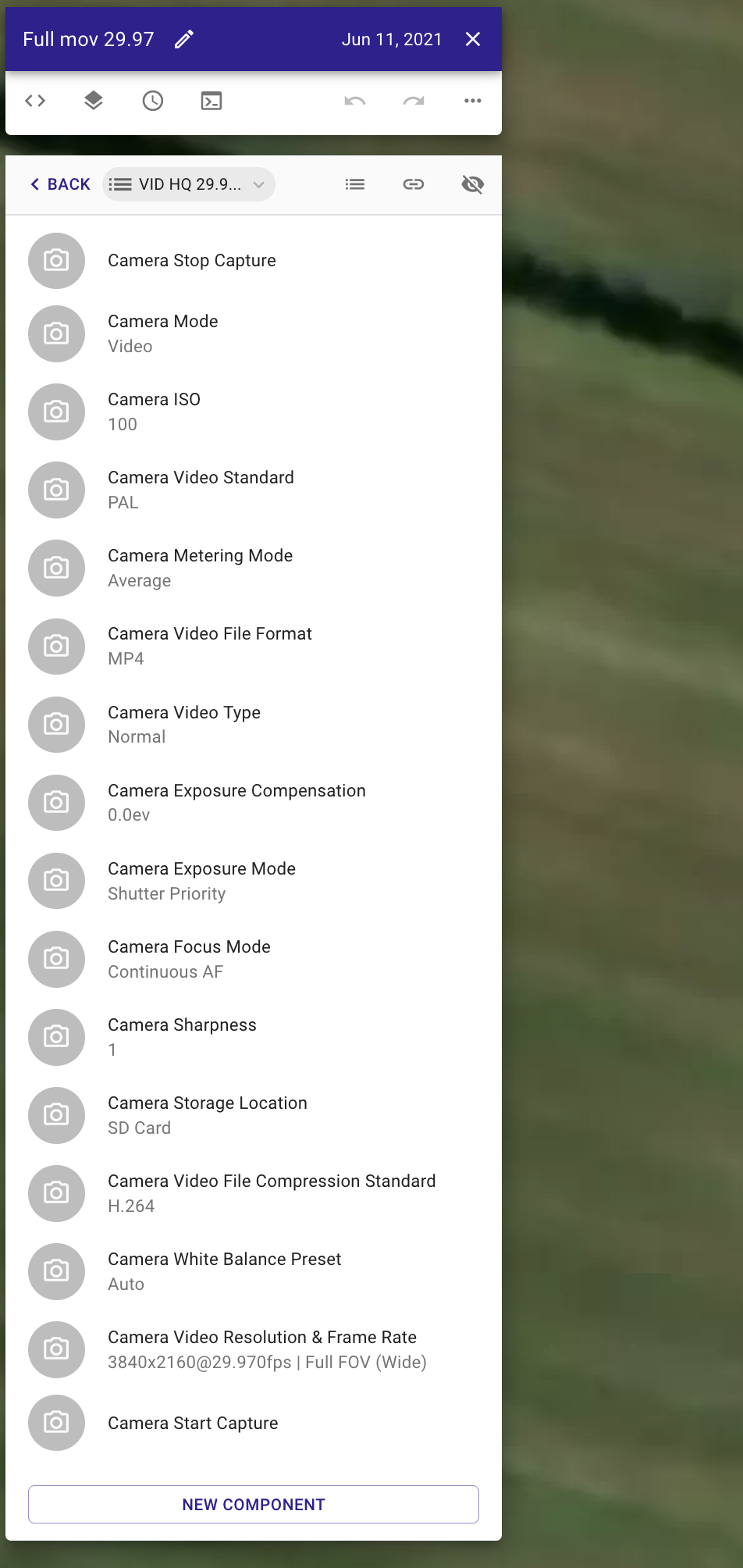
Since I keep getting this error message using Dronelink with my Mavic 2 Pro drone, I did some test using various Video resolutions and frame rates.
So I made a very simple mission that starts with the camera settings and then a path with 2 waypoints and 4 markers.
I tested the following Video Resolution & Frame Rates:
- 3840X2160 HQ 29,97 fps
- 3840X2160 HQ 47.95 fps
- 3840X2160 Full FOV 29.97 fps
- 3840x2160 Full FOV 47.95 fps
- 2688X1512 30 fps
- 2688X1512 24 fps
- 2688X1512 60 fps
- 1920x1080 30 fps
- 1920x1080 24 fps
- 1920x1080 60 fps
Only the mission 1) succeeded!
The other 9 missions failed and showed the same error message(S).
I will upload 3 screen prints of the mission settings and one screen print as an example of the, but for the resolution and frame rates, identical error messages.
After all this, but in the same flying session, I tried every resolution and frame rat setting combination by manually putting the in in DJI GO 4 App: these all functioned flawlessly!
So, either I do something wrong, or there is a problem with Dronelink in combination with the Mavic 2 Pro, or both.
I would appreciate if someone could help me solve my problem(s).
Many thanks and Kind regards,
Jan Somers
The Netherlands
Comments
5 comments
I had a similar issue awhile ago which I asked Jim about. I’m using the MA2 but I believe it’s probably the same issues. The only frame rates which will work with mine are the decimal ones. None of the rounded ones like, 24” 25, 30, 48, 50, 60, etc, aren’t set up to work. The Exceptions are with the 120 and 240 which works with mine. So just use the 29.970, and other decimal ones. It’s DJI, not DL.
Enjoy, Mike…….
Link to other post:
https://support.dronelink.com/hc/en-us/community/posts/1500000675742-Frame-Rates
Hi Mike,
Thank yopu for your quick reply!
It really helps me; I do not have to look for a solution any more.
As I wrote, I succeeded with 29.97, but I also did try 47.950 and that failed!. See attachment.
From the post in the link that you supplied I read that I have to put those figures in paranthesis; did you do that also?
Hi Jan. No parenthesis can be added. That was just a reference in the post to the actual frame rates vs others.
I don’t know if the M2P can utilize the Narrow or Wide “video field of view “ setting or what it even does to be honest. I always leave mine set to (default.) with my MA2. I Just set the resolution and FR and they have worked. Try setting to default and see if that eliminates the frame rate failure. There are a lot of functions/features in the Web app which will not work on all drones. It depends on which model you have and it’s capability. Basically if the drones capabilities aren’t available in the DJI app it probably won’t work in DL.
Camera commands testing: If you are not aware on how to test the camera commands to see which ones will work you can do it without actually flying. Just create a plan with only camera commands you want to test. The Only thing that should be in the plan is the Purple reference pin, (no approach or path.) This way it won’t try and take off and can be tested inside your home. It’s a good idea to remove the props just to make sure for safety reason. It will run the camera commands and tell you if something is not correct. If it runs the commands without any issue then you know which ones will work in any mission.
Good luck, Mike………
Hi Mike,
Yesterday morning I made some 16 test flights with always the same, simple, path but with different camera settings.
I tried various combinations of resolutions, frame rates and Field of view (FOV) settings.
Mij conclusions are that I can use 4K (3840X2160) with HQ (Narrow) and Full FOV (Wide), both with only 29.97 fps.
I can use 2.7 K (2688x1512) with only "Default" FOV and 29.97 , 47.950, and 59.94 fps
The same goes for 1080 (1920X1080).
Yesterday evening I saw your post.
I did not know I could test without actually flying! So I once again learnt something!
When performing some tests earlier, on other items, I always took off the propellers: safety first.
So for me now everything is clear regarding Resolution and Fps settings.
Many thanks for your helpful posts and suggestiona: I do really appreciate that!
Kind regards,
Jan Somers
The Netherlands
Your welcome. If any other questions there are others on this forum or there is an Official Facebook Dronelink group which can help. It takes time to learn all the functions/features DL has to offer. I’m still learning after 6 months or more.
Enjoy. Mike………
Please sign in to leave a comment.