Video capture start, mode and stop incorrect

Hello guys,
i have create a Dronelink Route. I want the camera to start recording the video immediately. I get one error messages in Dashboard.
"Camera Mode attempted before camera stop capture.
Recommendation: Add a camera stop capture command before this command."
So i must first stop the camera with stop command?
Can u help me?
Link to my route: https://app.dronelink.com/markus-petri/my-first-project/plan/pin4pwgsFcX2yz3JuBJM/WrgUknW4w0lEgHN8lBtg
Have a nice day!
### Screenshots ###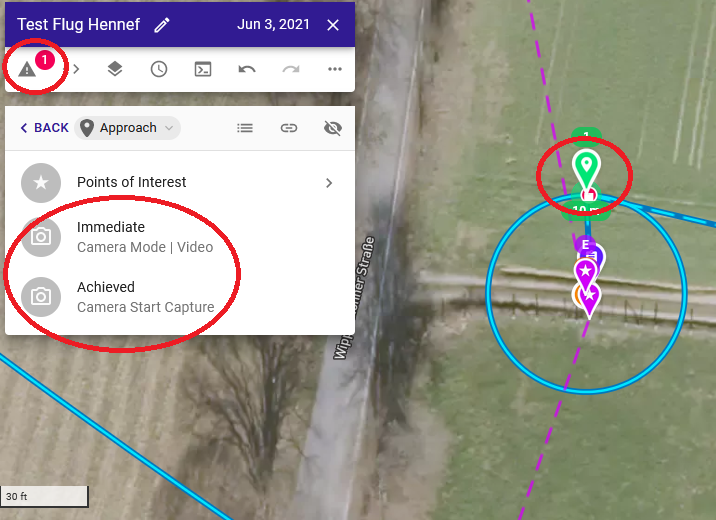
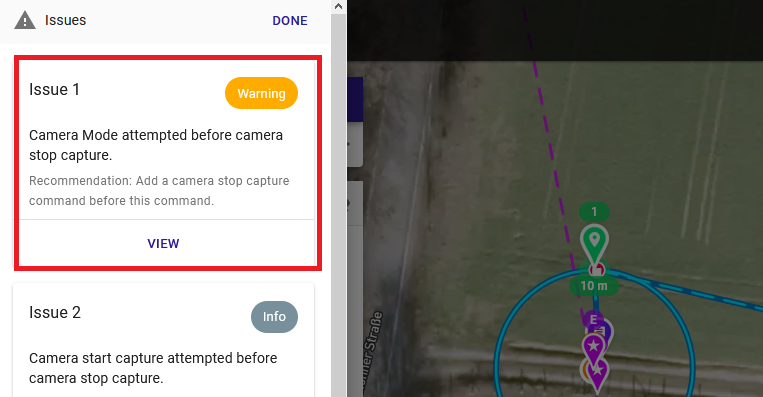
Comments
5 comments
Just use automatic capture instead:
I have the same issue. When I add automatic capture to an orbit component, I cannot find a way to add other settings (photo file format, interval etc). So I have to add other components at the start of my mission. It is strange I have stop capture while I did not start anything. Or do I overlook something ?
If using the auto-capture make sure you manually set the camera settings before flight since it will use those. ISO, Shutter, White balance etc., otherwise it will use whatever was last set and may be completely wrong settings. You can add camera settings commands at beginning of the plan so auto-capture will use those but if doing all that then may as well use a list
I just created a few different lists for camera command settings. Saves a lot of time and gives more control of my camera automatically. A stop capture needs to always be put at top of camera list whether it’s a photo or video. Also need a stop capture somewhere in the plan if recording video or it will warn it never stopped also. DL has the ability to create components list easily in the Web app. I like using a list instead of auto-capture because this way I won’t need to remember changing all the camera settings manually before flight and completely blow the missions video or photos. At my ripe-old age, I forget things. Lol……. Everyone has their way of setting up their plans. Whichever works best or easiest for each. Enjoy…
Thank you, works now indeed. Confusing : stop something when nothing was started :)
The problem is, you don't know if the camera will be recording when you are planning the mission, so you have to assume the worst case scenario (that it will be) and stop it first so you can set the setting you want.
Please sign in to leave a comment.