Manual focus in a mapping mission.

I want to have manual focus in a mapping mission, but I have not worked out how to achieve it.
By running this mission in preview I see that the camera is set to autofocus.
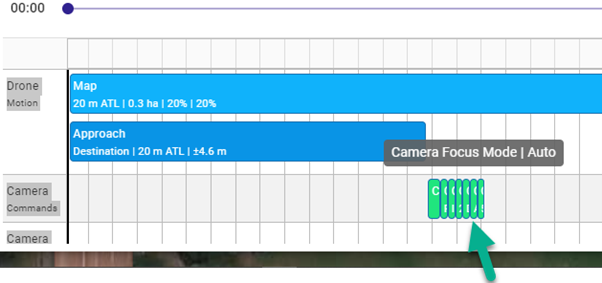
By default, the focus is set to auto in a command that seems to be a fixed part of the mapping tool.
The autofocus command is the sixth command in the series pointed to by my green arrow.
The seven embedded commands are as follows:
Camera stop capture
Camera mode photo
Camera photo type – Interval
Camera photo interval 2 seconds
Camera auto-lock Gimbal – Disabled
Camera Focus Mode – Auto
Camera Focus 50% | 50%
My question is, What is the best way to override that focus command?
I do not want to lose the mapping functionality,
I simply wish to specify my own focus and exposure parameters.
I did try using immediate and achieved components to insert my commands, but my manual focus command appeared at the beginning of the camera commands before the embedded commands.
I assume the later embedded autofocus command would override my manual focus camera command.
Comments
6 comments
Not possible right now, moving to feature requests.
This request is possibly not so much a feature request.
I think this is more the choice to include or not a feature in any particular mission.
A simple switch to stop focus and any exposure commands being imposed on the mapping script would resolve this issue.
I imagine that this could be done very quickly with minimal thought.
The essential automated mapping functions would remain.
I would be very interested in hearing any comments from experienced mappers because I believe that mapping benefits from not having random changes in focus between image captures. I have also gathered that results benefit from good manual control of exposure and lighting settings.
We've already done something similar in facade: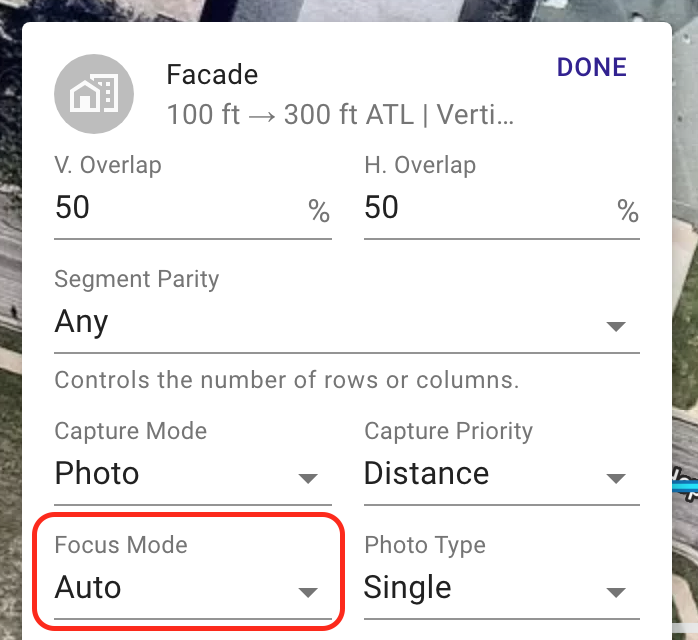
You are correct, it isn't complicated (most of the feature requests are not). We just have a list a mile long so it always comes down to priority.
Thanks Jim for taking the time to reply.
I might say that if you could tilt the Façade 90 degrees, it might do what I have asked for.
Come to think of it; my next request was going to be for mission on an inclined plane.
Unfortunately, neither of those options would be accessible to me on my hobbyist plan.
I will wait patiently.
Having looked at the Trello board, I see you do have a list a mile long.
Jim, is this now possible? I want to layout the mission for the P4 RTK (or P4P), take off to map altitude. Then manually set focus and exposure, then continue the mission.
Maps no longer auto focus by default.
Please sign in to leave a comment.