MAVIC AIR 2 RTH DON´T WORK

Hello
I use DroneLink for about three months now, since the test version for the Mavic air 2. In the final version the automatic RTH seems to not work, there are two missions already and I had to return the drone manually. I have configured all the correct parameters in the web application and I don't think I am doing something wrong. If you can help me please.
Greetings from Bolivia
Comments
41 comments
Hello John,
I have tested the MA2 with the latest firmware and Dronelink production app and had no issues having RTH trigger normally going up to RTH altitude and landing; whether in imperial, metric, triggered manually in the app, controller, or at the end of the mission.
Would need to see the mission, or get screen recording to try to further troubleshoot.
Best,
Jacob
Jacob Rachniowski
Did you see the info in another thread about there being a problem if you switch between imperial and metric units?
I was flying my Air 2S the other day and can tell you there is something strange going on there. I was using the DJI app and I set the RTH at 100m. But I prefer to see things in ft so I switched the output to imperial and, instead of showing me the RTH alt of 328ft, it showed it as 100ft.
Crazy!
Sounds like a DJI issue though. Probably best not to switch back and forth.
Update - unboxed two new Mavic Air 2 drones since my last post. Updated to the latest firmware before flight. One had the RTH issue and one did not. On the one that did, I ran it through the Assistant 2 software and no more issues. Thanks for all of the feedback.
I must have jinxed myself by responding to this thread and saying all was good. Since my last post I have 4 different MA2 units that are having RTH issues again. I recalibrated sensors in DJI Assistnat 2 and made sure I was on the latest firmware. Tried flying in Metric and Imperial and both failed over and over again. I am having this issue in DJI and after completing a mission in DL. One unit I'm having trouble with just came from DJI as a care refresh replacement. It worked for about a week before starting to have RTH issues. Here is a screen shot of a flight log I did in DJI just to show what it is doing.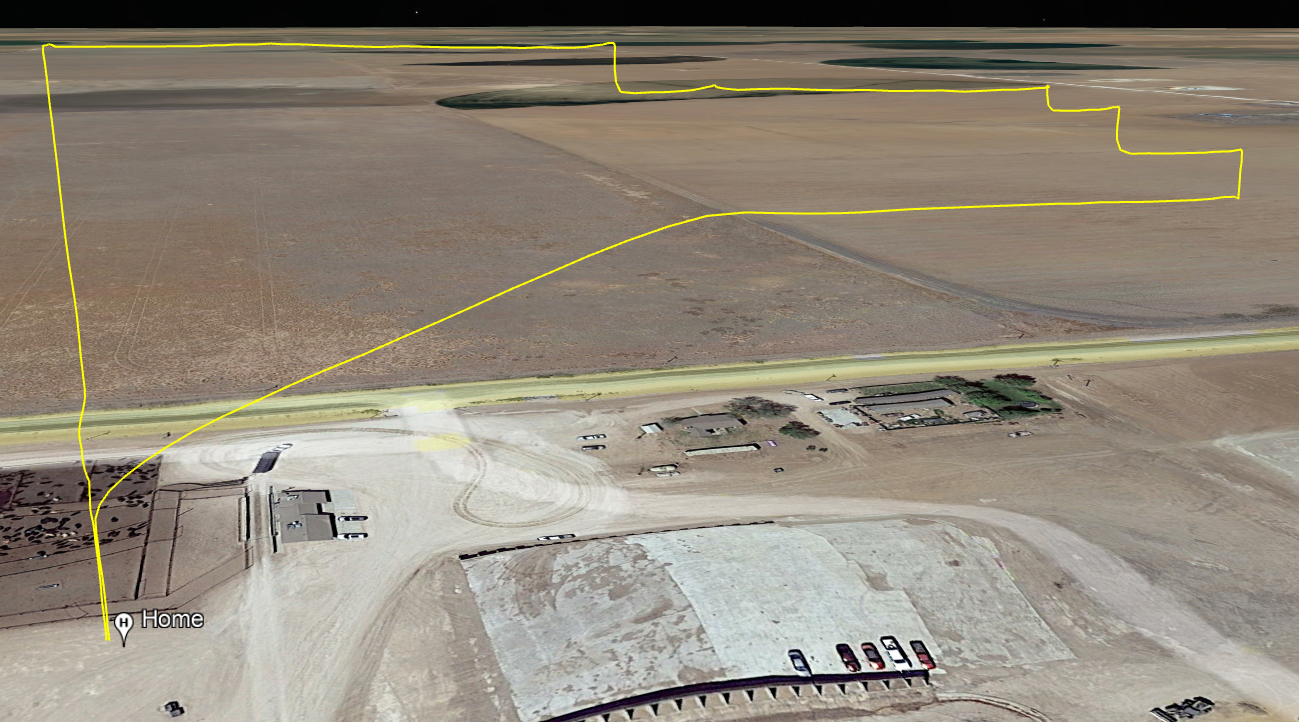
Can you provide a screen shot of the RTH information in the DJI Fly App?
Since this is happening in both Fly and DL it is probably going to be easier to troubleshoot over there.
Also, can you include the location? I'm wondering if you are hitting DJI boundaries given the odd flight RTH path.
I don't have the tablet with me that I was using to fly with. RTH was set to 197ft at one point and then I adjusted it to 210ft to see if that would make a difference. I can't remember which RTH height was used on the screenshot I posted above. I was posting on this forum to see if others were having the same issue.
Hi John,
What I would like to see is the RTH altitude vs the maximum altitude. If the RTH altitude is set above either the maximum altitude set in the Fly app, or some localized DJI limit (there are a lot of them around and they are not always marked) then the drone could be trying to climb, hitting the limit and getting confused.
Personally, that is where I would start to look.
Hope that helps.
Max altitude was set to 500 ft. RTH was either 197 ft or 210 ft. This particular drone is being flown in rural Texas Panhandle where there isn't an airport anywhere close. We've been flying in this area since this summer and just recently started having this issue. Appreciate the feedback.
John,
I noticed a strange issue with the A2S when switching between imperial and metric. So it's not inconceivable that it is setting the RTH altitude to 197 meters, even though it says feet. If that is the case then 197 meters is much higher than 500ft.
I know...it shouldn't be like that but...software. So change the max to 1,000ft or the RTH to 50ft (if safe to do so) and try again. If that works then you know where your issue is.
In terms of not being near an airport, that doesn't mean there isn't a DJI restriction there. I've flown in places that are in the middle of nowhere and still encountered them because there was a secret building nearby that they don't want photographed. They don't publish them because they don't want people to go looking for them. But...in that case, you should get an error that makes sense if you manually try to fly too high in the Fly app - I know I did in the Go4 app.
Hi John. It may be the issue DJI is having with some of the MA2 Aircrafts not updating to the latest firmware properly. Luckily I didn’t need to go through this and my MA2 RTH has been working properly with both DL and DJI Fly app on many flights. You may want to take a look at DroneDJ website or check on DJI website for this possible fix. It may be a pain but could be necessary. Good luck.
https://dronedj.com/2023/01/18/dji-air-2-firmware-error/
Please sign in to leave a comment.