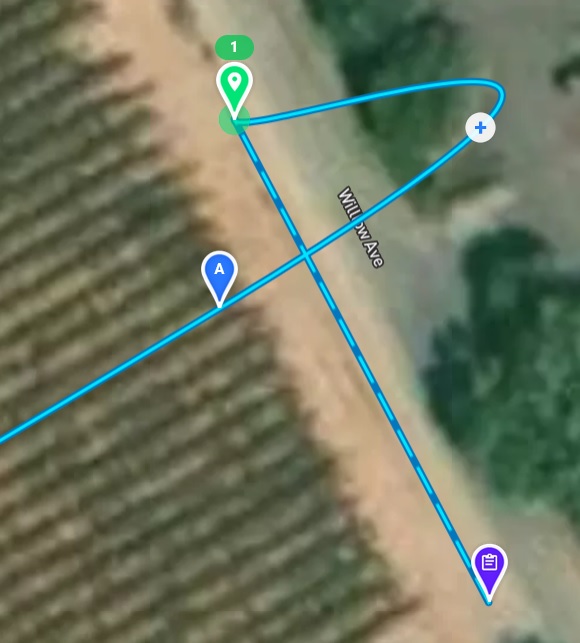
Weird path between Approach and Waypoint A

Hello all,
I did not do a very good search because I am not sure how to word this. I have a strange path out between the Approach and Waypoint A. I have tried moving things around, Moved A to the right, the left up and down, no joy. This is also attempt number 2, on the first one it did it also, trashed it and started over. Attempt 2 has the same issue.
I have attached a screenshot of it, let me know what details help.
~Thanks Justin
Comments
7 comments
This is how Bezier curves work. If you don't like this behavior you might want to select this option:
I noticed that last night, it did fix the issue. Further into the plan I have 2 turns that I would like curved instead of Straight. Can I use a Marker to switch this?
No, you just create a second path component.
Sorry to ask this but how do I add another Path? When I do that I get a whole new set of coordinates to setup.
https://app.dronelink.com/signalseeker/justin-manning-public/plan/29VreDuRbYOMQQp8wD7n
Here is a copy I made public. I have the curve at the end trying to make it look like the drone slides out.
Thank you for the help, Justin
That is how it works, a new Path is a whole new set of waypoints.
I think I am confused here, to get to my Path I need another Path?
A given plan can have multiple instances of the Path component, each complete with their own unique approach and set of waypoints. Each Path instance can also have its own pathing attribute - curved or straight.
So, in your case when you finish with your curved path you simply add another Path component, make the pathing straight and deploy its own approach and desired waypoints.
Please sign in to leave a comment.