Mission preview shows drone flying backwards

*** Resolved*** I understand that there is a difference between the flight path and recording or where the gimbal is pointing. I've tried any number of times to just have the gimbal face the same way as the flight path, set up POI's and such but as soon as I watch it on a preview it's facing back to where the takeoff point is! I've had it to actually point in the same direction as the path but then it goes back to filming the the takeoff point. Could someone explain what I'm doing wrong please? I've used POI's along the fligth path but the preview shows the gimbal and front of the drone pointing back to the takeoff point then back to the route then back to the takeoff as it flies alon the flight path... TIA
Comments
3 comments
Share the mission and I'm sure we can identify the issue
I have the answer to this now thanks. The "Drone Heading" needs to be set at 0 degrees (zero degress) to the drones path between waypoints, that way the drone will record along the same path as it flies.
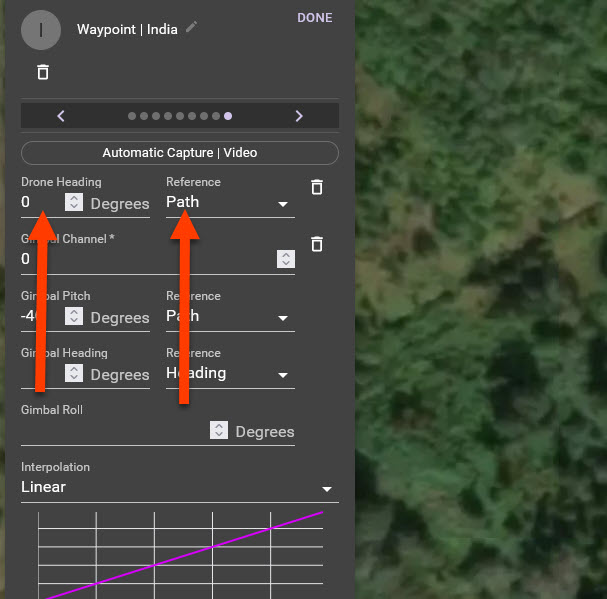
Anytime you add a POI it will stay on that point for the entire path until you change it. So yes, adding a marker after the POI at some point will be needed. Also realize when you set the interpolation to linear or curved it will start interpolating to the 0° on path just after the POI marker. You can addd a second marker to that POI and place it where you want on the path so it will stay on the POI until it reaches a a specific point.
Please sign in to leave a comment.